How to measure AI visibility, with or without a tool
Measure AI visibility free with Search Console, Bing and GA4, plus a manual audit you can repeat monthly, and see when a paid tracker is worth it.

Short on time?
Short on time? Here's my take.
- No budget yet
- Search Console, Bing and GA4, plus a monthly audit
- All free, plus about 20 prompts asked 3 times on 3 engines each month.
- One brand, ready to pay
- Peec AI Starter
- $95 a month for 50 prompts on 3 models, checked daily. Verified 17 Nov 2026.
- Testing the idea cheaply
- Otterly AI Lite
- $29 a month in the US view, from my 13 Nov roundup (€29 shown to me on 17 Nov).
- Already paying for Semrush
- Semrush AI Visibility Toolkit
- $99 a month per domain, billed annually, for 25 prompts tracked daily. Verified 17 Nov 2026.
- Agency with several clients
- SE Visible
- $89 a month for 5 projects up to $399 for 30. Verified 17 Nov 2026.
Prices verified . Google, Bing and vendor pages verified 17 Nov 2026; OpenAI's help page read 16 Nov. No vendor paid to be included, and sponsors can't buy a verdict.
You can get a first read on your AI visibility without paying anything. Google, Bing and OpenAI now publish some of the data themselves, and the rest you can check by hand, as long as you do it the same way every month.
I read Google’s, Bing’s and OpenAI’s reporting pages, vendor pricing pages and three top-ranking how-tos to build a free stack, a repeatable manual audit, and the point where a paid tool earns its fee. The tools are compared in my AI visibility hub.
What are you actually measuring? #
Four things: whether AI answers name you, whether they link to you, how that compares with your rivals, and whether anyone clicks through. No single free source covers all four.
- Mentions: the answer names your brand.
- Citations: the answer links to your page as a source.
- Share against competitors: how often you appear next to rivals. AI share of voice explains why your competitor list changes that number.
- Clicks: visits from an AI answer. That’s an outcome, not visibility: an answer can name you without sending anyone.
Still deciding between classic rankings and AI numbers? Rank tracking vs AI visibility sets the two side by side.
What can you measure for free? #
More than most guides admit: Search Console for Google’s AI features, Bing for Copilot, GA4 for chat-assistant visits and Business Hub for ChatGPT. Each sees one slice.
None of the three ranking how-tos I read mentions Search Console’s AI report or Bing’s. AirOps builds on GA4 and a spreadsheet, Improvado uses Search Console only as a branded-search proxy, and Webtures sticks to definitions.
| Free source | Engines | What it counts | Competitors? | The catch |
|---|---|---|---|---|
| Search Console generative AI report | Google AI Overviews and AI Mode, combined | Impressions of your links, by page, country, device and date | No | No clicks, queries or positions; small sites may not see it |
| Bing AI Performance | Copilot, Bing's AI summaries, select partners | Citations, cited pages, grounding queries | Partly: a beta list of queries where others appear and you don't | A sample of citation activity; clicks not mentioned |
| GA4 AI Assistant channel | Sources like ChatGPT, Gemini, Deepseek, Copilot, Grok (full list not published) | Visits arriving from AI assistants | No | Excludes Google's AI Overviews and AI Mode; visits with no referrer land in Direct |
| ChatGPT Business Hub | ChatGPT only | Website mentions, clicks and discovery topics, past 28 days | No | Identity check before you see insights; no prompts |
| Free one-off checkers | 3 to 6 engines, by vendor | Mentions and cited sources for the vendor's prompts | Not in the free version | A snapshot; you can't pick the prompts |
| Your own manual audit | Whichever engines you open | Named, cited and rivals named, per answer | Yes | Your time, and answers change between runs |
Source: Google, Microsoft and OpenAI help pages and blogs; Ahrefs and Exploding Topics tool pages. Verified 17 Nov 2026 (OpenAI 16 Nov). Scroll sideways for more columns.
What does Search Console show? #
Impressions of your links in AI Overviews and AI Mode, counted together, by page, country, device and date. It shows no clicks, no queries and no positions.
Google defines them as “how many times links to your site were shown to a user in a generative AI feature on Google Search”, and says “As of August 31, 2026, we’ve rolled out these insights to all websites worldwide” (Search Console help). Google’s AI optimization guide names it as the place to see how your content performs in AI features.
Two catches: two results from your site in one AI feature count as “a single impression in the chart total”, and a missing report “usually happens when your site hasn’t received enough impressions”. The full walkthrough is in what Search Console’s AI report shows, and how the two Google surfaces it combines differ is in AI Mode vs AI Overviews.
What does Bing add? #
Citations from Copilot and Bing’s AI summaries, plus the phrases the AI searched with. Since October it also lists queries where other sites get cited and yours doesn’t, the only free competitor signal I found.
Bing’s AI Performance report, in public preview since 10 February 2026, covers “Microsoft Copilot, AI-generated summaries in Bing, and select partner integrations” (Bing Webmaster blog). It reports citations, cited pages, page-level activity, trends and grounding queries: “the key phrases the AI used when retrieving content that was referenced in AI-generated answers”, so the AI’s wording, not your customer’s. Bing says “The data shown represents a sample of overall citation activity”, and the announcement doesn’t mention clicks.
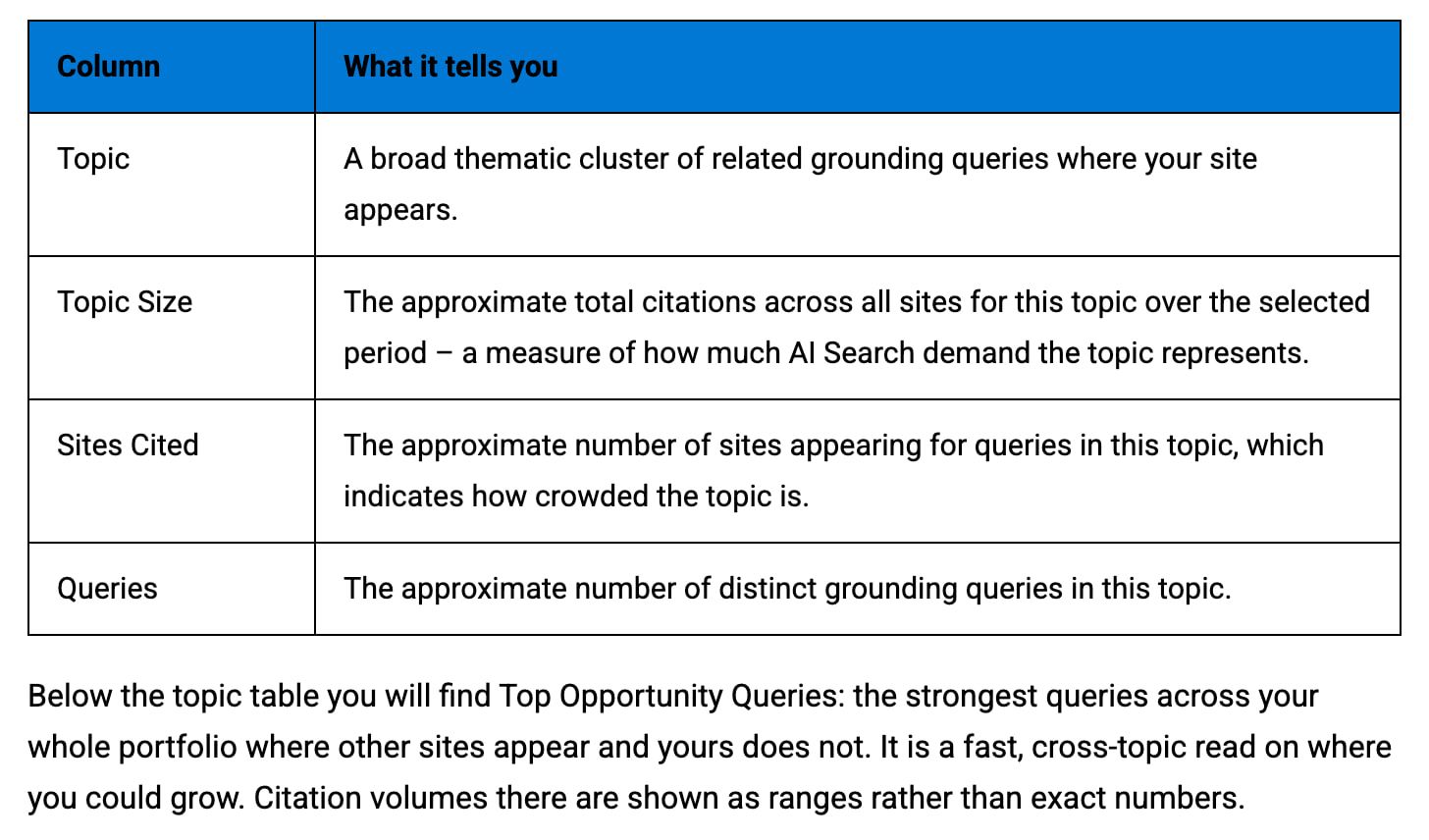
The newer piece is Topics Portfolio, which Bing shipped on 13 October “with a beta label”. A topic is “A broad thematic cluster of related grounding queries where your site appears”, and Top Opportunity Queries are “the strongest queries across your whole portfolio where other sites appear and yours does not” (Bing, Oct 2026).
That’s a ready-made gap list for the manual audit below; how to read Bing’s AI Performance report covers every view and its limits.
Can GA4 see AI traffic? #
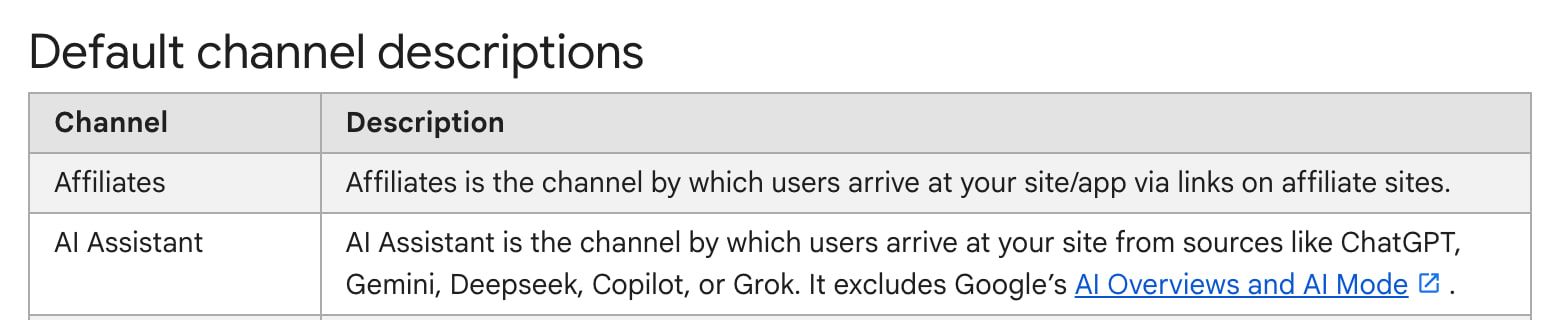
For chat assistants, yes. GA4’s default AI Assistant channel groups visits from sources like ChatGPT, Gemini, Deepseek, Copilot and Grok. It leaves out Google’s AI Overviews and AI Mode, whose clicks land in Organic Search.
Google’s help page, which I read in a browser on 17 November, says it plainly: “AI Assistant is the channel by which users arrive at your site from sources like ChatGPT, Gemini, Deepseek, Copilot, or Grok. It excludes Google’s AI Overviews and AI Mode.” Organic Search, on the same page, covers “non-ad links in organic-search results, including Google’s AI Overviews and AI Mode” (GA4 help).
GA4 sets the medium to “ai-assistant” “if the referrer matches a list of AI Assistants”. Google doesn’t publish that list. Search Engine Journal reported Google naming Claude as an example in May, but today’s help page names neither Claude nor Perplexity, so I wouldn’t assume either lands there.
Visits with no referrer, from in-app browsers, apps or pasted links, still land in Direct, SEJ notes. Default channel groups “can’t be edited”, so for your own rule Google’s route is a custom channel group. Either way, this channel counts clicks, the outcome, not how often an assistant named you. For a vendor’s modeled estimate of the visits an AI answer may have prompted, see what Semrush’s AI-influenced traffic is really estimating.
What about ChatGPT’s own numbers? #
ChatGPT’s Business Hub shows 28 days of website mentions, clicks and discovery topics, free, after you claim your business and pass an identity check. It shows no prompts and no competitors.
For an online business, OpenAI counts a mention when ChatGPT references your website; your brand name alone doesn’t count. A blank metric doesn’t necessarily mean zero activity (OpenAI help, read 16 Nov).
The catch is access: a Persona identity check, which may ask for a government ID or business registration, comes before any insights. I weigh it against a cheap tracker in does ChatGPT Business Hub replace your AI tracker?
How do you run a manual AI visibility audit? #
Fix about 20 prompts, ask each one 3 times on 3 engines in a logged-out window, and log whether you’re named, whether you’re cited and who else appears. Repeat monthly with the same prompts.
This is my method, built from vendor docs and published studies; it hasn’t been applied to a real site. None of the three ranking guides gives a run count, so here’s the reasoning for each step.
- Write about 20 prompts: roughly 15 that don’t name you and 5 that do. Bing’s opportunity queries are a good source, and how many prompts to track explains why 20 is a start, not a target.
- Pick 3 engines your buyers use. The free sources above show which already cite you or send visits.
- Use a private, logged-out window, in one country, on one device type. Google ties AI Mode personalization to users aged “18 or older” (AI Mode help). Peec, which collects answers logged out, calls that “the approach closest to the average user’s experience” (Peec docs).
- Ask each prompt 3 times per engine. One answer is a snapshot (more on that below). 20 prompts × 3 engines × 3 runs makes 180 answers a session, by my arithmetic.
- Log every answer with the same fields, using the table below, plus a screenshot.
- Report by topic, not by prompt. “Named in X of N answers about pricing” holds up better than “we came second for prompt 7”. Always state the N.
- Repeat on the same day each month, with the same core prompts. Change the list and you can’t compare months.
| Field | Example entry | Why it matters |
|---|---|---|
| Date and engine | 17 Nov, ChatGPT | Answers shift by engine and over time |
| Prompt and run number | Prompt 4, run 2 of 3 | Lets you count how often, not just whether |
| Brand named? | Yes or no | Your mention rate |
| Your URL cited? | Yes: /pricing/ | Your citation rate, and which page earns it |
| First brand named | Competitor A | Who the answer leads with |
| All competitors named | A, B and C | Feeds your share against rivals |
| Tone toward you | Positive, neutral or negative | Catches answers that name you badly |
| Screenshot file | 2026-11-chatgpt-p4-r2.png | Proof for a boss or client, and a check on your own log |
Source: My method, built from Google's AI Mode help, Peec's docs and published studies on answer churn. Not run on a site. Scroll sideways for more columns.
I found no source that measures how long one answer takes to log, so I won’t put a time on it. Plan for real work: 180 answers is a lot of reading.
What do manual checks miss? #
Personalization, location, answers that change from one run to the next, and AI Overviews that don’t show for your query that day. Even a careful monthly session is a snapshot.
Answers churn. SparkToro and Gumshoe repeated 12 prompts 60 to 100 times each on ChatGPT, Claude and Google AI, and found less than a 1 in 100 chance of the same brand list twice; the same list in the same order came up less than 0.1% of the time (Search Engine Journal). Gumshoe sells AI tracking tools, which the study disclosed. If one of your citations goes missing, start with the lost-citation checklist.
Google’s AI Overviews move too. Ahrefs found an AI Overview has “a 70% chance of changing” between observations and persists about 2.15 days (Ahrefs). So three runs is a floor, not a sample size; I work through the margins of error for repeated checks separately.
A logged-out window also can’t copy your buyer’s signed-in, located, personalized session, and AI Mode may return “a set of web links” instead of an answer when its confidence is low (AI Mode help). What a manual audit does well is show you the actual answer, with its wording and tone, which no impressions count gives you.
Are free AI visibility checkers worth a look? #
As a one-off snapshot, yes. Ahrefs and Exploding Topics both run their own prompts for you, free, but you can’t pick the prompts or track change over time. I compare every free checker, plan and trial in free AI visibility tools.
Ahrefs’ AI Visibility Checker queries “ChatGPT, Gemini, Perplexity, Copilot, and Google AI Overviews” (its FAQ adds AI Mode), needs “No signup, no credit card”, and shows “a limited preview (top 5 results per section)” (Ahrefs). History, competitors and custom prompts sit in paid Brand Radar.
Exploding Topics’ checker runs “150 live queries across three AI platforms (ChatGPT, Perplexity, and Gemini)” and returns a 0 to 100 score that includes citation rate and sentiment, with “No signup required!” (Exploding Topics). The page notes that “Exploding Topics is owned by Semrush”.
Neither page says how the prompts are chosen for your brand, and both are a way in to a paid tool. I’d run one before your first manual audit to see which engines name you at all, then move on.
When is a paid tool worth it? #
When you need competitors tracked over time, more than one audit a month, or engines beyond the three you check by hand. That’s my threshold, and the free layer can’t cover the first one beyond Bing’s opportunity list.
The arithmetic: a manual session gives you 180 answers a month, while Peec AI Starter collects 4,500 (50 prompts × 3 models, daily), 25 times as many, for $95 (Peec pricing).
| Your situation | My pick | Price | Why |
|---|---|---|---|
| One brand, want daily data and competitors | Peec AI Starter | $95/mo, verified 17 Nov 2026 | 50 prompts on 3 models, daily: 4,500 answers a month |
| A pilot under $50 | Otterly AI Lite | $29/mo in the US view (my 13 Nov roundup); €29 shown to me on 17 Nov | 2,000 credits a month, which Otterly frames as 16 prompts daily on 4 engines |
| Already paying for Semrush | Semrush AI Visibility Toolkit | $99/mo per domain, billed annually, verified 17 Nov 2026 | 25 custom prompts, daily, inside the suite you have |
| Agency with several clients | SE Visible | Basic $89/mo ($71 billed annually); Agency $399 ($319), verified 17 Nov 2026 | 5 projects on Basic, 30 on Agency |
Source: Vendor pricing pages, 17 Nov 2026; Otterly's US price from my 13 Nov tracker roundup. Scroll sideways for more columns.
Otterly’s FAQ says “Prices are in USD or EUR”, so I don’t convert its euro price (Otterly); the $29 is from my AI Overview tracker roundup. Semrush’s pricing page says “$99/mo per domain” billed annually, but its help center words it differently, so check the term at checkout. SE Visible’s annual prices come from its page’s 20% yearly toggle (SE Visible).
For cost per answer at your volume, try the AI visibility cost calculator; for what these tools do behind the dashboard, read how AI visibility tools work.
Stale advice you'll still find (checked 17 Nov 2026)
- “Otterly costs $29 for 15 prompts.” That’s Improvado’s table. Otterly’s page now frames Lite as 16 prompts or 2,000 credits a month (Otterly).
- “Ahrefs has a free weekly AI Overviews tracker.” Also Improvado’s. Ahrefs’ free page is a one-time checker showing “a limited preview (top 5 results per section)”; tracking lives in paid Brand Radar (Ahrefs).
- “Start with a custom channel group in GA4.” AirOps still leads with that; GA4 now has a native AI Assistant channel.
- “Track your position inside the answer.” Webtures lists it as a metric and scores it. With the same brand list in fewer than 1 in 100 runs, I’d report how often you appear and treat position as context.
- “Over 60% of Google searches show AI answers.” AirOps links no report for it. Measured figures: how many searches show AI Overviews.
What do you do with the numbers? #
Fix what the data points at. My checklist, in order:
- Search Console: keep the facts current on the pages with the most AI impressions, since Google’s AI features already show them. What Google has said about how AI Overviews pick the pages they cite tells you what else to check.
- Bing: check that you have a page answering each top opportunity query directly.
- Your audit log: the prompts where rivals are named and you aren’t are your content gaps, by topic. Which competitors AI names instead of you shows how to tally the rivals and the sites cited beside them.
- GA4: watch the AI Assistant channel month to month, as the outcome.
Which setup should you pick? #
Start free, audit for a month or two, and pay once the threshold above bites:
- No budget: the free stack plus a monthly audit. Search Console, Bing AI Performance and GA4’s AI Assistant channel, plus about 20 prompts × 3 engines × 3 runs. Claim your Business Hub too if you can pass the identity check. To turn the numbers into a report for a boss, see how to show AI visibility ROI.
- One brand, ready to pay: Peec AI Starter, $95 a month (verified 17 Nov 2026), the same pick as in my post on prompt counts. Full ladder: Peec AI pricing.
- Testing the idea cheaply: Otterly AI Lite, $29 in the US view per my 13 November roundup. Details: Otterly AI pricing.
- Already on Semrush: the AI Visibility Toolkit, $99 a month per domain, billed annually. Compared in Semrush AI toolkit vs Ahrefs Brand Radar.
- Agency: SE Visible, $89 to $399 a month for 5 to 30 projects. More in AI visibility tools for agencies.
Keep the free stack running after you pay. Search Console and Bing are Google’s and Microsoft’s own counts, the best check on any tracker’s numbers.
FAQ
Can I measure AI visibility for free?
Partly. Search Console counts your AI Overview and AI Mode impressions, Bing shows Copilot citations, GA4 counts visits from chat assistants and ChatGPT's Business Hub shows ChatGPT mentions. For competitors, add a monthly manual audit; Bing's opportunity list is the only free competitor signal I found.
Does GA4 show traffic from AI Overviews?
Not separately. GA4's AI Assistant channel excludes Google's AI Overviews and AI Mode, and Google's help page puts those clicks in Organic Search.
How many times should I run each prompt?
At least 3 times per engine in each session, in my method. AI answers change from run to run: SparkToro found the same brand list in fewer than 1 in 100 runs. The full reasoning is in my post on how many prompts to track.
Should I check logged in or logged out?
Logged out, in one country, on one device type, so one month compares with the next. Google ties AI Mode personalization to users aged 18 or older, and Peec collects its answers logged out as the approach 'closest to the average user's experience'.
Are free AI visibility checkers accurate?
They're snapshots built from the vendor's own prompts. Ahrefs shows a limited preview of the top 5 results per section, and Exploding Topics runs 150 queries on 3 engines once. Fine for a first look, not for tracking.
When should I pay for an AI visibility tool?
Once you need competitors tracked over time, more than one audit a month, or more engines than the 3 you check by hand. For one brand, Peec AI Starter at $95 a month (verified 17 Nov 2026) collects 4,500 answers a month.
Sources
20 sources, accessed to .
Official pricing, docs, changelogs and status pages 14
- Search Console help: generative AI performance report
- Google Search Central: optimizing for generative AI features
- Google Analytics help: default channel group (AI Assistant), read in Chrome
- Google Search help: AI Mode
- Bing Webmaster blog: AI Performance public preview, 10 Feb 2026
- Bing Webmaster blog: Topics Portfolio beta, 13 Oct 2026
- OpenAI help: setting up your business on ChatGPT (read in Chrome)
- Peec AI: pricing
- Peec AI docs: how answers are collected
- Otterly AI: pricing, shown in euros
- SE Visible (SE Ranking): pricing
- Semrush: AI Visibility Toolkit pricing
- Ahrefs: free AI Visibility Checker
- Exploding Topics (owned by Semrush): AI visibility checker
News and press 2
Other blogs 4
- Ahrefs (sells Brand Radar): how often AI Overviews change, Nov 2025
- AirOps (sells an AI visibility platform): how to measure AI search visibility, 2 Nov 2026
- Webtures (GEO agency): how AI visibility is measured, 1 Jul 2026
- Improvado (marketing data vendor): how to measure AI search visibility, updated 6 Oct 2026
Last updated: 17 November 2026. Facts verified 17 Nov 2026 (OpenAI’s help page 16 Nov). Researched and drafted with AI tools; owner review is pending.


