Search Console and AI Overviews: what the report shows
Search Console counts AI Overview and AI Mode impressions by page, country and device. What it leaves out, and when you need a tracker.

Short on time?
Short on time? Here's my take.
- Most small and mid-size sites
- Search Console's generative AI report
- Free. It shows which of your pages Google's AI features display, by country and device. Start here.
- You also want Copilot and Bing
- Bing Webmaster Tools AI Performance
- Free: citations, cited pages and sampled grounding queries.
- You need keywords and your spot in the AI Overview
- SE Ranking Core
- $129 a month ($103.20 a month billed annually), verified 17 Nov 2026. My pick in the AI Overview tracker roundup.
- You need ChatGPT and other engines, with competitors
- Peec AI Starter
- $95 a month for 50 prompts on 3 engines, verified 17 Nov 2026.
- You want AI Overview clicks
- Your normal Web clicks, for now
- Search Console doesn't split them out, and no tracker I have read claims it; see what may change on 3 December.
Prices verified . Google and Bing docs and vendor prices verified 17 Nov 2026. No vendor paid to be included, and sponsors can't buy a verdict.
Search Console now has a report for Google’s AI features, and the guides ranking for it disagree on basic facts. Two still describe a UK-first rollout, and one describes filters Google never documented.
I read Google’s help pages, its anomaly log and John Mueller’s notes to show what the numbers mean, what they miss, and when free data is enough. For the paid side, start at my rank trackers hub.
What does Search Console show about AI Overviews? #
One number: impressions, meaning how many times links to your site were shown in AI Overviews or AI Mode, by page, country, device and date. All sites have had access since 31 August 2026.
Google’s definition: “Impressions are how many times links to your site were shown to a user in a generative AI feature on Google Search.” The report “includes impressions for” AI Overviews and AI Mode together (Search Console help).
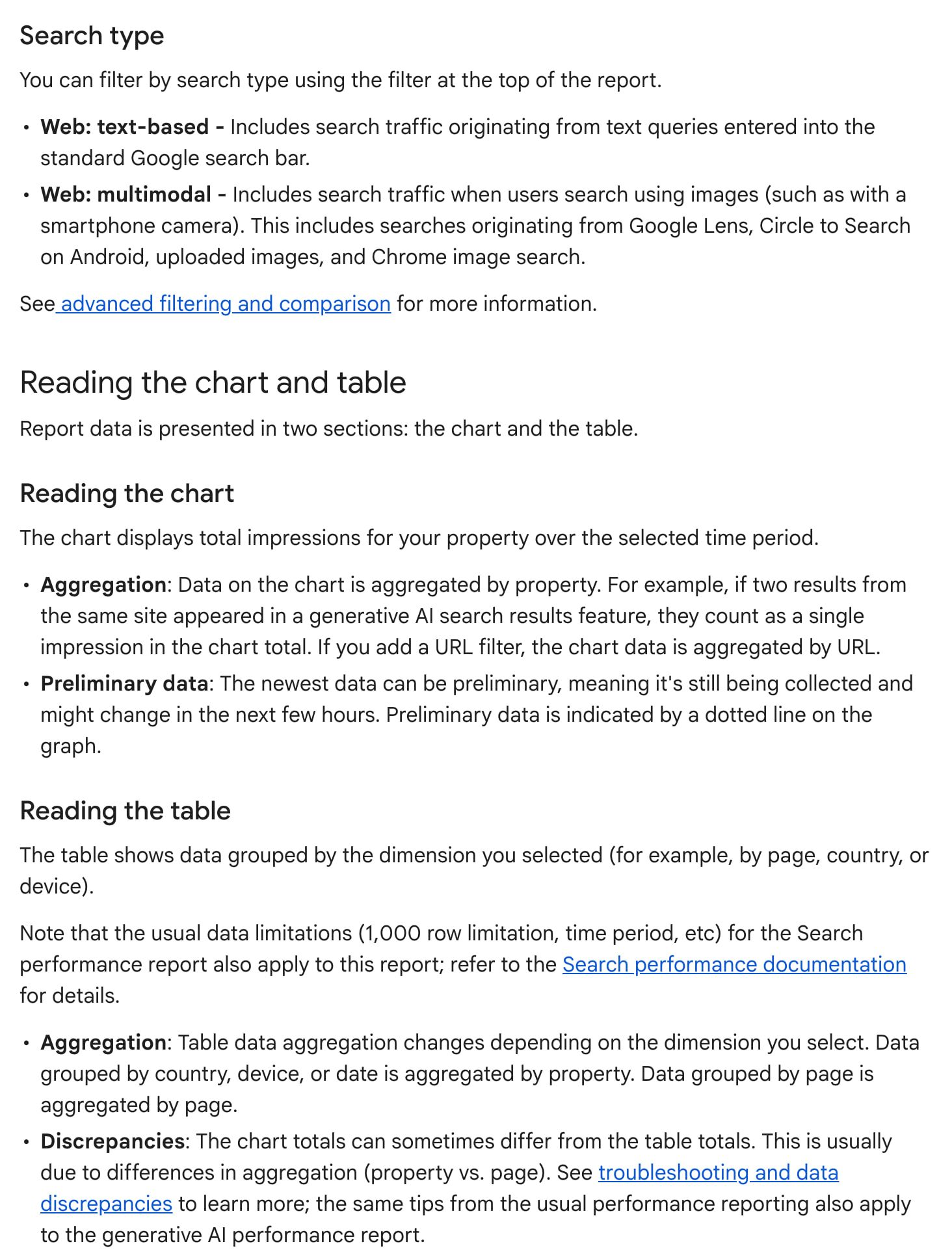
Its dimensions are pages, countries, dates and devices (“desktop, tablet, or mobile”). A search type filter splits “Web: text-based”, the standard search bar, from “Web: multimodal”, which covers Lens and Circle to Search. All dates are in Pacific Time, and the newest data “can be preliminary” and change within hours.
Google announced it on 3 June 2026 for “a subset of websites”, with “hourly, daily, weekly, and monthly granularity”, then added: “As of August 31, 2026, we’ve rolled out these insights to all websites worldwide.” (Search Central blog). Search Engine Roundtable reported the global release on 1 September.
So guides that still describe a UK-first test, such as Pasquale Pillitteri’s and SEO Hacker’s, are out of date. Google says it’s “adding additional metrics over time” but hasn’t said which.
Where do you find it? #
Through the “Open the Generative AI performance report” link on Google’s help page, which goes straight to it. Small sites may not see it until they’ve had enough AI impressions.
The help page says the report may not show if “your site hasn’t received enough impressions” (Search Console help). It also stays empty if you’ve excluded your site from AI features, which I cover under Discover below.
Some guides give a menu path. I’d use Google’s own link from the help page instead, since I haven’t opened a property to confirm where the menu puts it.
What counts as an impression? #
A link to your site shown in the AI answer. Links hidden behind an expand control count only when someone opens them, and two of your results in one AI feature count once in the chart.
Google’s help page sets three rules (Search Console help):
- “if two results from the same site appeared in a generative AI search results feature, they count as a single impression in the chart total”
- “Data grouped by page is aggregated by page”
- “The chart totals can sometimes differ from the table totals”
So if two of your pages appear in one AI Overview, the chart counts one impression and the page table counts each page once (my reading of those lines). Don’t expect the table to add up to the chart.
John Mueller filled in the rest on Bluesky: “The impressions are based on links to your site being shown in AI Overviews / AI Mode”, and “If something needs to be “activated” to see the link, it would only count when users do that.” A favicon linked to a page “would count” (SER, SEJ).
One rule is secondhand. PPC Land reported in January that the same URL in an AI Overview and in the blue links on one page counts as one impression, per Mueller as relayed by Mark Williams-Cook on LinkedIn. There’s no direct quote, and Google’s help only states the per-site rule within one AI feature.
Last, these impressions are already in your main report. Google’s AI features doc says AI Overviews and AI Mode traffic is “included in the overall search traffic” under the Web search type. Don’t add the two reports together.
What can’t it tell you? #
Which query triggered the AI answer, whether it was an AI Overview or AI Mode, who else was cited, or where your link sat inside it.
| Your question | Can the report answer it? | Why |
|---|---|---|
| Which of my pages appeared in AI features? | Yes | Pages dimension |
| In which countries, and on which devices? | Yes | Countries and devices dimensions |
| Which query triggered it? | No | No query dimension |
| Was it an AI Overview or AI Mode? | No | One combined impressions number |
| Who else was cited? | No | Your site's data only |
| Where did my link sit inside the answer? | No | No position in this report |
| Search Labs experiments? | No | 'Search Console doesn't include data from experiments in Search Labs' |
| Can a small site see it? | Not always | Hidden until the site has enough impressions |
| Can I pull it by API? | Not per Google's API reference | No AI search type in the Search Analytics API |
| Can I export it? | Yes, from the interface | Usual 1,000-row limit; '~' and '-' export as zeros |
Source: Search Console help (generative AI report), Search Analytics API reference. Verified 17 Nov 2026. Scroll sideways for more columns.
On the API: its search types are discover, googleNews, news, image, video, web and webMultimodal, with no AI type (API reference). My reading is that you can’t pull this report programmatically, so export it from the interface on a schedule if you want your own record.
One ranking guide describes “AI Overviews” and “AI Mode” values under the Search Appearance filter, with their own metrics (ThinkProfits). Google’s docs describe no such filter, and Search Engine Journal found no Search Appearance type for AI features on 2 November.
Your AI Overview clicks sit inside your normal Web clicks, since Google says a click on an external link in an AI Overview “counts as a click” (Search Console help), and what may change for UK searchers from 3 December is in will Search Console finally show AI Overview clicks?
What about position in the main report? #
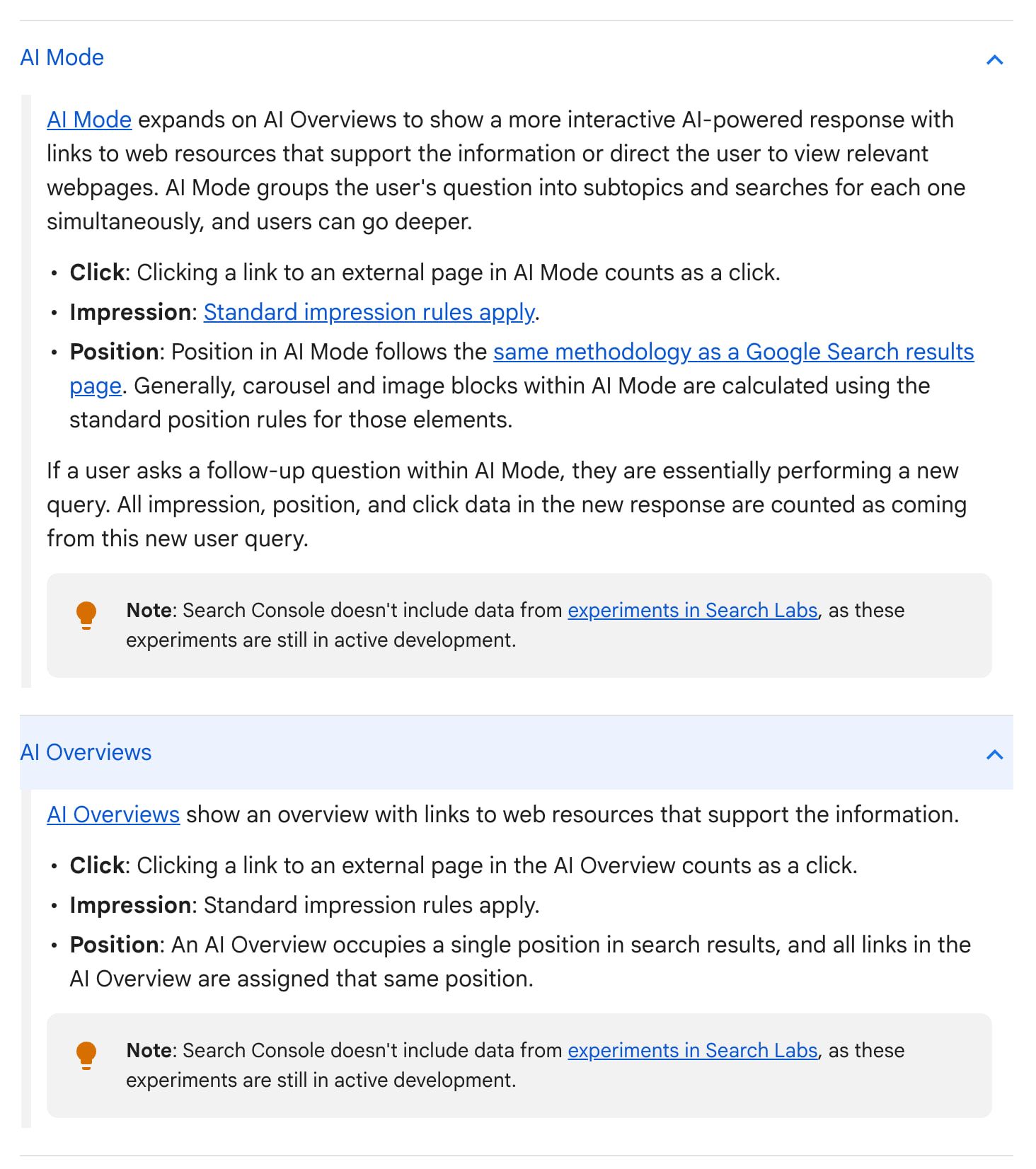
Every link in an AI Overview gets the overview’s single position. AI Mode links get their own positions, and a follow-up question counts as a new query.
Google’s words: “An AI Overview occupies a single position in search results” and “all links in the AI Overview are assigned that same position”. In AI Mode, position “follows the same methodology as a Google Search results page”, and a follow-up is “essentially performing a new query” (Search Console help). Glenn Gabe noted in 2025 that in AI Mode “each listing can have a unique position” (GSQi).
An older trick was to filter for queries at a position below 2 to spot AI Overviews (Practical Ecommerce). Mueller, quoted in that piece, said “I don’t know if AIO is always shown first”, so position 1 doesn’t prove an AI Overview. Now that the dedicated report exists, I’d skip the trick.
Expect the rules to shift. In September Mueller said AI position reporting will “evolve over time”, adding: “The goal is not a written-in-stone absolute truth for position counting (that’s impossible)” (SER).
Can you trust the numbers? #
Mostly, but check Google’s anomaly log first: logging errors cut AI impressions on 13–17 August (since restored) and 9–11 November 2026. The newest days are preliminary.
Both entries on Google’s data anomalies page read: “A logging error caused a decrease in impressions on the Generative AI performance report in Search.” The November one adds “This issue affects data logging only”, and the August one was updated on 21 August: “Missing data for this period has been restored.” The Discover side has its own entries, on 24 June and 13 August.
| Date (2026) | What happened | What I'd do |
|---|---|---|
| 24 Jun and 13 Aug | Logging errors listed for Discover | Skip those days in the Discover report |
| 13–17 Aug | Logging error lowered AI impressions in Search | Restored on 21 Aug; re-export if you saved data before then |
| 9–11 Nov | Logging error lowered AI impressions in Search | Leave these days out of comparisons |
| Newest days | Preliminary data, shown as a dotted line | Wait before reading them |
Source: Search Console data anomalies and help pages. Verified 17 Nov 2026. Scroll sideways for more columns.
The November error fell during the core update, which I cover in did the November 2026 core update hit you?
Search Console lets you add annotations to a Performance chart, up to 120 characters, visible to everyone with access to the property (Google, Nov 2025). I couldn’t confirm they show on the generative AI chart, so mark the dates on the main chart at least.
How do you read it without a tracker? #
Compare each page’s AI impressions with its Web impressions over the same dates. That ratio is a rough share of the page’s search exposure that came through AI features.
This is my method, built from Google’s docs; I haven’t run it on a site:
- Pick 28 days that skip 9–11 November.
- In the generative AI report, group by page and note each page’s AI impressions.
- In the main Performance report, Web search type, same dates, note the same pages’ impressions.
- Divide AI by Web for each page. AI impressions already sit inside Web (AI features doc), so this is a share, not an extra.
- Switch to countries and devices to see where AI exposure concentrates.
- Mark the anomaly dates, and export each month.
Treat the ratio as rough, because the AI report counts per site per feature in its chart and per page in its table. A page with a high share is where AI answers do more of the showing, and it’s the first page I’d check in a tracker.
Windsor.ai publishes a similar per-page table from its own site; it sells Search Console connectors.
What about Discover? #
Discover has its own generative AI report, counting at most one impression per result per session, keyed to the canonical URL.
Its impressions are “how many links to your site that a user saw in generative AI features in Discover”, in a “standard Discover card, or embedded in a carousel” (Discover help). The page shown is the canonical URL, “not the page where the user lands”, and the device breakdown applies to Search only.
The opt-out control covers both. Google’s Search generative AI control, under Settings > Search generative AI, lets you exclude your site from AI Overviews, AI Mode and generative AI in Discover; it “isn’t used as a ranking or inclusion signal affecting other parts of Search”, an excluded site “won’t receive any traffic or impressions from these features”, and it takes effect “within 1-2 days”. I weigh that trade in should you opt out of AI Overviews?
How does it compare with Bing and paid tools? #
Search Console and Bing are free and show your own visibility; trackers add queries, competitors and other engines.
Bing’s AI Performance report, in public preview since 10 February 2026, covers Microsoft Copilot, AI-generated summaries in Bing and “select partner integrations” (Bing Webmaster blog). It counts citations, cited pages and grounding queries, and adds what Google’s lacks: the phrases. I go through each view in what Bing’s AI Performance report shows.
Its help page adds the caveats. Grounding queries are “not full user questions or prompts”, “The data shown represents a sample of overall citation activity”, and the report “does not measure rankings, authority, performance, or importance”. Data refreshes daily and exports to CSV or Excel. By June, Practical Ecommerce reported, Bing had added intent, topic and citation share per grounding query.
| Search Console generative AI report | Bing AI Performance | SE Ranking Core | Peec AI Starter | |
|---|---|---|---|---|
| Engines | Google AI Overviews and AI Mode (Discover separate) | Copilot, Bing AI summaries, select partners | Google AI Overviews for your keywords; AI Mode through 25 bundled prompts | 3 engines you choose, including AI Overviews and AI Mode |
| What it counts | Impressions | Citations and cited pages | AI Overview presence, your link and its position | Mentions, visibility, share of voice, citations |
| Queries or prompts | None | Grounding queries, sampled | Your keywords | Your 50 prompts |
| Clicks | Inside Web totals | No | No | No |
| Competitors | No | No | Yes | Yes |
| AI Overviews vs AI Mode | Combined | Not applicable | Separate features | Separate engines |
| Export | Interface only; not in the API | CSV and Excel | Not checked | Not checked |
| Price | Free | Free | $129/mo, $103.20/mo billed annually | $95/mo, 1 country |
Source: Google and Bing help pages and blog; SE Ranking and Peec AI pricing pages, verified 17 Nov 2026; SE Ranking's AI Overview features from my tracker roundup, verified 13 Nov 2026. Scroll sideways for more columns.
SE Ranking Core holds 2,000 keywords checked daily plus AI Visibility at “25 prompts daily, 5 AI engines” (SE Ranking pricing); its AI Overview citation and position tracking is covered in my tracker roundup, linked in the picks below. Peec AI Starter is 50 prompts on 3 models, checked daily, with AI Overviews and AI Mode among the models you can pick (Peec pricing).
Is Search Console enough, or do you need a tracker? #
For most small and mid-size sites, yes, to start: it tells you which pages Google’s AI features show, where and on which device, for free. Pay when you need the queries, competitors, the AI Overview and AI Mode split, or other engines.
- Most small and mid-size sites: Search Console’s generative AI report. It answers “are my pages showing in AI features, where, and on which device”, which is the first question. Run the per-page ratio above each month.
- You also want Copilot and Bing: add Bing AI Performance. It’s free and the only one of the two that shows phrases, even if sampled and grouped.
- You need the keywords and your spot inside the AI Overview: SE Ranking Core, $129 a month ($103.20 a month billed annually), verified 17 Nov 2026. It was my overall pick in the AI Overview tracker roundup for daily AI Overview citations with your link’s position.
- You need ChatGPT and other engines, with competitors: Peec AI Starter, $95 a month (verified 17 Nov 2026). Before buying any AI visibility tool, read how AI visibility tools work for the questions to ask.
If you’re unsure which kind of measurement you need at all, rank tracking vs AI visibility sets them side by side, and how many searches show AI Overviews gives a sense of how much of your search exposure this report can cover.
FAQ
Does Search Console separate AI Overviews from AI Mode?
No. The generative AI report gives one impressions number that covers both features, and its only dimensions are pages, countries, devices and dates.
Does the generative AI report show which queries triggered AI Overviews?
No. It has no query dimension. Bing's AI Performance report is the free option that shows phrases, as sampled grounding queries, and only for Copilot, Bing's AI summaries and select partners.
Are AI Overview impressions counted in my normal Performance report too?
Yes. Google says AI Overviews and AI Mode traffic is included in your overall search traffic under the Web search type, so don't add the two reports together.
Why don't I see the generative AI report?
Most likely your site hasn't received enough AI impressions yet, or it's excluded from AI features through the Search generative AI control. Google says the report has been available to all websites worldwide since 31 August 2026.
Can I pull the AI report through the Search Console API?
Not as far as Google documents. The Search Analytics API's search types are discover, googleNews, news, image, video, web and webMultimodal, with no AI type, so export from the Search Console interface instead.
Does opting out of AI features hurt my rankings?
Google says the control isn't used as a ranking or inclusion signal for other parts of Search. An excluded site gets no traffic or impressions from AI Overviews, AI Mode or generative AI in Discover.
Sources
26 sources, accessed to .
Official pricing, docs, changelogs and status pages 13
- Search Console help: generative AI performance report (Search)
- Google Search Central blog: generative AI performance reports, 3 Jun 2026 (updated 31 Aug)
- Search Console help: generative AI performance report (Discover)
- Google Search Central: AI features and your website
- Search Console help: how impressions, position and clicks are counted
- Search Console help: the Search generative AI control
- Search Console help: data anomalies (Aug and Nov 2026 logging errors)
- Google Search Central blog: custom chart annotations, Nov 2025
- Search Console API reference: Search Analytics query search types
- Bing Webmaster blog: AI Performance public preview, 10 Feb 2026
- Bing Webmaster Tools help: AI Performance
- SE Ranking: pricing (Core and Growth)
- Peec AI: pricing (Starter)
News and press 8
- Search Engine Roundtable: generative AI report and control go global, 1 Sep 2026
- Search Engine Roundtable: Mueller on how AI impressions are counted, Jun 2026
- Search Engine Journal: Mueller explains how AI search impressions get counted
- Search Engine Roundtable: Mueller on AI position reporting, 16 Sep 2026
- PPC Land: one URL, one impression (Mueller, relayed), 22 Jan 2026
- Search Engine Journal: no Search Appearance type for AI features, 2 Nov 2026
- Practical Ecommerce: Bing's improved AI Performance section, 22 Jun 2026
- Practical Ecommerce: how Search Console reveals AI Overviews, 20 May 2025
Other blogs 5
- Glenn Gabe (GSQi): AI Mode in Search Console, updated Jun 2025
- ThinkProfits (agency): Search Console AI reports, Jul 2026 (contradicted by Google's docs)
- Windsor.ai (sells Search Console connectors): how to track AI Overviews, updated Nov 2026
- Pasquale Pillitteri (consultant): Search Console generative AI report, 3 Jun 2026
- SEO Hacker (agency): generative AI performance report, undated
Last updated: 17 November 2026. Facts verified 17 Nov 2026. Researched and drafted with AI tools; owner review is pending.


