How to track ChatGPT traffic in GA4, and what it misses
GA4 now sorts ChatGPT visits into an AI Assistant channel, but not AI Overviews or visits with no referrer. Where to look, and how to fill the gaps.

Short on time?
Short on time? Here's my take.
- Everyone with GA4
- The built-in AI Assistant channel
- It's already in your Traffic acquisition report. Nothing to set up.
- You want Perplexity, Claude and tagged links counted for sure
- A custom channel group with a short source regex
- Place it above Referral. Google says custom groups can apply to past data too.
- You want a free second opinion
- Microsoft Clarity's AI channels
- Counts ChatGPT, Copilot, Gemini, Claude and Perplexity visits, with AI ad clicks split out.
- You need mentions, not just clicks
- ChatGPT Business Hub, or Peec AI Starter
- Business Hub is free for ChatGPT. Peec Starter is $95 a month for 50 prompts on 3 models (verified 17 Nov 2026).
Prices verified . Facts from Google Analytics Help, Microsoft Learn, OpenAI and Bing help pages, verified 17 Nov 2026. No vendor paid to be included, and sponsors can't buy a verdict.
Most guides still tell you to build an AI channel in GA4 from scratch. Google added one in May, and none of the top three guides in my search mentions it. I read Google’s help pages, Microsoft’s Clarity docs and those three guides to show what the built-in channel catches and what still slips into Direct.
Below: where to find ChatGPT visits today, why some go missing, a safer regex if you want your own channel, and the other sources that cover what GA4 can’t. For the bigger measurement picture, start at the AI visibility hub.
Does GA4 have an AI channel now? #
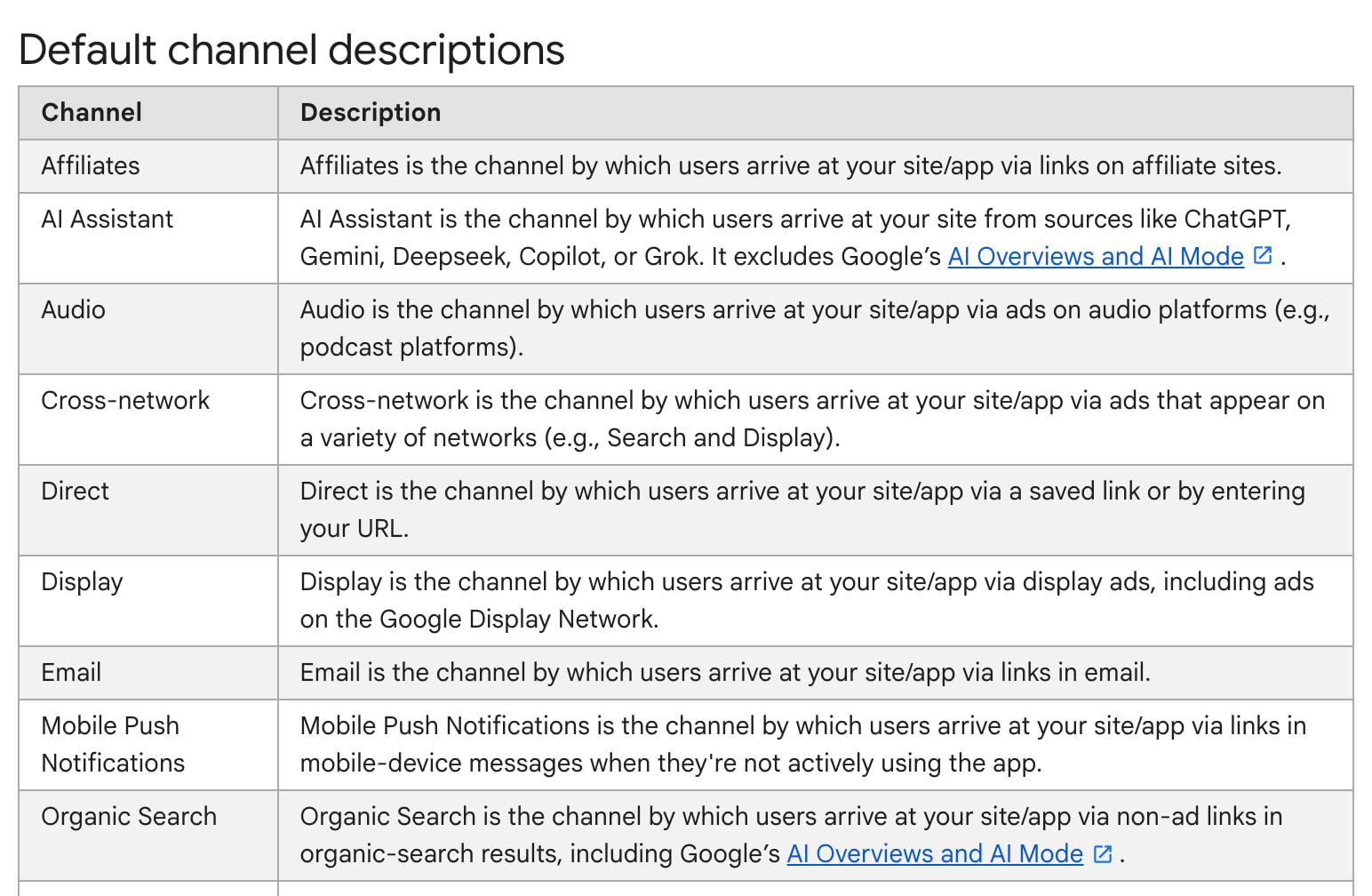
Yes. Since mid-May 2026 GA4’s default channel group has an “AI Assistant” channel for visits from sources like ChatGPT, Gemini, Deepseek, Copilot or Grok. You don’t have to set anything up.
Google’s help page defines it: “AI Assistant is the channel by which users arrive at your site from sources like ChatGPT, Gemini, Deepseek, Copilot, or Grok. It excludes Google’s AI Overviews and AI Mode” (GA4 help). Search Engine Journal reported the addition on 14 May 2026, noting “Property owners don’t need to configure anything” (SEJ).
The rule behind it: a visit lands there when its medium is “ai-assistant”, which GA4 sets “if the referrer matches a list of AI Assistants”. That list isn’t public. SEJ notes “Google hasn’t published the full list of recognized AI assistant referrers”, and today’s help page names neither Claude nor Perplexity.
Two more limits. Default channel groups “can’t be edited”, so for your own rule you need a custom group. And neither Google’s page nor SEJ says whether the channel reclassifies visits from before May.
Where do you find ChatGPT visits? #
Open Reports → Acquisition → Traffic acquisition, find the AI Assistant row, then switch the dimension to session source to see chatgpt.com on its own line.
That’s the report Surfer’s and Writesonic’s guides start from (Surfer); the difference now is that the AI Assistant row is already there.
If that row is missing or tiny, don’t assume ChatGPT sends nothing. Some of its clicks arrive with no referrer and get counted as Direct, as the next section explains.
Why do some ChatGPT visits show up as Direct? #
When a click arrives without a referrer, from an app, an in-app browser or a pasted link, GA4 can’t tell it came from ChatGPT. It files the visit under Direct.
SEJ puts it plainly: “AI assistant traffic that arrives without a referrer header still lands in Direct” (SEJ). Microsoft’s Clarity docs describe the same gap for its own AI channels.
October showed how big that gap can get. Around GPT-6’s release, ChatGPT links opened with noopener,noreferrer, which dropped both the referrer and the utm_source=chatgpt.com tag, Search Engine Roundtable reported on 14 October 2026 (SER).
Adobe’s Huesler summed it up: “There’s no tag and no referrer, so your analytics files the visit under direct.” Across about 500 pages, his data showed ChatGPT visits down about 31,000 a day and Direct up about 26,000. Huesler’s 15 October update, as SER reported it: “It was a bug. ChatGPT is tagging its links with utm_source=chatgpt.com again.” SER’s report carries no comment from OpenAI.
That tag is your backup when the referrer is missing. ChatGPT has added it to citation links since at least June 2025, when PPC Land reported it spreading to the “More” section, with the value utm_source=chatgpt at the time (PPC Land). I couldn’t find a Google page saying how GA4 channels a tagged visit that has no medium, which is one reason to match on session source yourself.
I found no sourced figure for what share of AI visits arrive with no referrer at all, so treat any number you see quoted with care.
Where do AI Overviews clicks go? #
Into Organic Search. Google’s help says the AI Assistant channel excludes AI Overviews and AI Mode, and the Organic Search channel includes them.
The Organic Search definition covers visits “via non-ad links in organic-search results, including Google’s AI Overviews and AI Mode” (GA4 help). So in GA4, a click from an AI Overview looks like any other Google organic visit.
Search Console doesn’t split them in its main report either: Google reports AI feature traffic “within the “Web” search type” (Google). Its separate generative AI report shows impressions only; I explain it in what Search Console’s AI report shows.
Do you still need a custom AI channel? #
Only if you want sources the built-in list may miss, like Perplexity or Claude, or a channel that also catches tagged ChatGPT links. It uses one of your two custom groups.
Google’s help sets the limits: 2 custom channel groups per standard property (5 on Analytics 360), up to 50 channels each. Custom groups “can be applied to your reports retroactively”, which beats starting from zero. Order matters: “Traffic is included in the first channel whose definition it matches given the current order” (custom channel groups help).
The steps, as Google’s help and Surfer’s guide describe them:
- Create a custom channel group in GA4’s channel group settings.
- Add a channel, for example “AI chat”, with a condition on Session source that matches the regex below.
- Use Reorder to move it above Referral, so AI visits aren’t counted as ordinary referrals first.
- Save it. Google says it can be applied to your reports retroactively, so you can compare with earlier months.
Surfer’s guide also says to place the channel above Referral and that it “works retroactively” (Surfer), which matches Google’s help.
Which regex should you use? #
A short list of exact domains with escaped dots, because Google Analytics regex is full-match and case-sensitive by default. This is my reasoning from Google’s help pages, untested in a live GA4 property, so check it against your own source list first.
Google’s regex help says: “By default, Google Analytics Regex is full regex and case sensitive.” A dot matches any single character unless you put a backslash before it, and a partial match needs .* (regex help). That help page doesn’t say it covers GA4 channel conditions specifically. Google’s custom channel group help does use a “matches regex” condition in its own AI assistants example and wraps each term in .*, but still check which match type your condition uses.
Here’s the list I’d start from:
chatgpt\.com|chatgpt|perplexity\.ai|www\.perplexity\.ai|gemini\.google\.com|copilot\.microsoft\.com|claude\.aiWhere each value comes from: chatgpt.com is the tag value in SER’s report and the site Clarity’s docs name; plain chatgpt is the older tag value PPC Land reported; copilot.microsoft.com is named in Clarity’s docs. The Gemini, Claude and Perplexity domains come from competitor guides’ regexes (Surfer’s), not from a vendor page I opened, and www.perplexity.ai is my own guess. I’d leave Grok and Deepseek to the built-in channel, since Google names them and I couldn’t verify their referrer domains.
If your condition turns out to be a partial match, the same list still works, but chatgpt will then match any source containing those letters.
| Term | What it can wrongly catch | Seen in |
|---|---|---|
| gpt (partial match) | Any source containing those three letters | Writesonic; Google's own example |
| bard (partial match) | Any source containing 'bard' | SEO Works, Writesonic; Google's own example |
| claude, gemini, copilot as bare words | Any source containing the word, under a partial match | SEO Works |
| edgeservices | A Microsoft Edge source not shown to be an AI assistant | Writesonic, Surfer |
| copy.ai, writesonic | Writing tools, not chat assistants | Surfer, Writesonic |
| Unescaped dots, as in chatgpt.com | Any character in place of the dot | Surfer |
Source: My reading of each guide's regex, and the example in Google's custom channel group help, against Google's regex help, 17 Nov 2026. Nothing was run in a GA4 property. Scroll sideways for more columns.
The guides have other gaps. SEO Works’ audience version of its regex drops grok, which its report version includes (SEO Works). Writesonic’s steps skip from 4 to 6 (Writesonic). And Surfer updated its guide on 9 September 2026, four months after the AI Assistant channel arrived, without mentioning it.
Can you double-check in Clarity? #
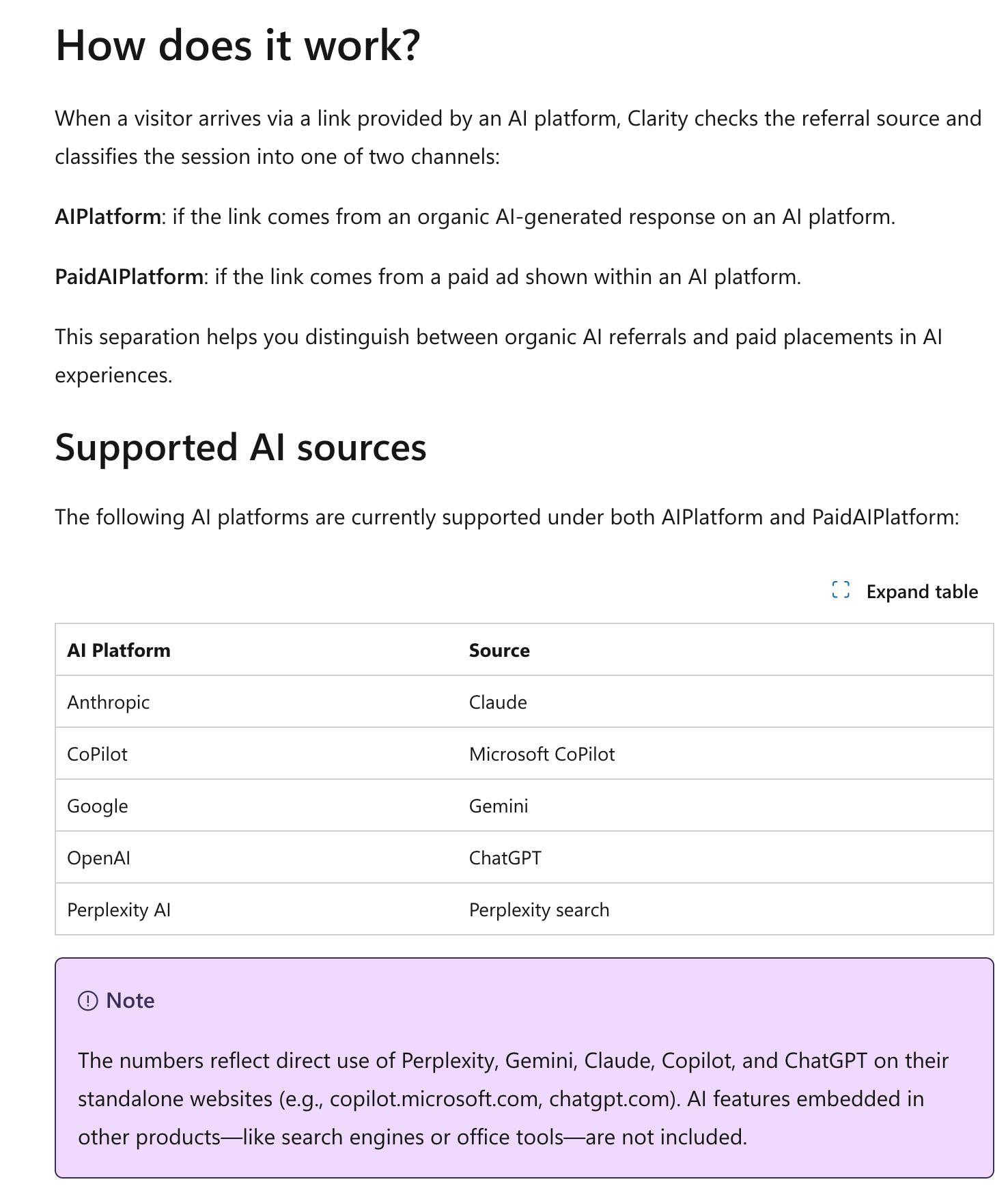
Yes, for free. Clarity’s AIPlatform channel counts visits from ChatGPT, Copilot, Gemini, Claude and Perplexity, and PaidAIPlatform splits out AI ad clicks.
Microsoft defines AIPlatform as sessions after a click on “a free, organic link within an AI platform’s chat experience”, and PaidAIPlatform as clicks on a paid ad in an AI chat (Clarity docs). The two launched on 29 August 2025 (Clarity blog), and Clarity calls itself “a free service forever” (Clarity FAQ).
The limits are worth knowing. The numbers “reflect direct use … on their standalone websites (e.g., copilot.microsoft.com, chatgpt.com)”, so AI features built into other products aren’t included. Visits with a hidden source go to Direct, as in GA4. And “Data before this feature’s release isn’t reclassified.”
The paid split matters now that ChatGPT sells ads (ads in AI answers): Google’s help page describes no paid split for the AI Assistant channel. Clarity also reports AI agents visiting your site, which I cover in AI agent traffic in analytics.
What can’t GA4 tell you? #
Whether AI answers mention you at all. GA4 only sees the people who click, and only when the click carries a referrer or tag it recognises.
| Source | What it counts | Covers | Misses |
|---|---|---|---|
| GA4 AI Assistant channel | Sessions with a recognised AI referrer | ChatGPT, Gemini, Deepseek, Copilot, Grok (list not public) | No-referrer visits (Direct); AI Overviews and AI Mode (Organic) |
| GA4 custom channel group | Sessions matching your source regex | Whatever you list, applied to past data | The same no-referrer gap; uses 1 of 2 slots |
| Clarity AIPlatform / PaidAIPlatform | Sessions from AI chat links, organic vs paid | ChatGPT, Copilot, Gemini, Claude, Perplexity | Hidden referrers; AI built into other products; no backfill |
| ChatGPT Business Hub | Mentions and link clicks inside ChatGPT, past 28 days | ChatGPT only | Visits: 'Clicks don't confirm website visits' |
| Bing AI Performance | Citations in Copilot and Bing's AI answers | Microsoft's AI surfaces | Clicks and traffic |
| Search Console | Impressions and clicks, AI features included | No split from web results in the Performance report |
Source: Google Analytics Help, Microsoft Learn, OpenAI Help and SER, Bing Webmaster help, Google Search Central. Verified 16–17 Nov 2026. Scroll sideways for more columns.
Business Hub is the closest thing to a ChatGPT dashboard. It shows mentions, website clicks and discovery topics over the past 28 days, after a Persona identity check (OpenAI Help). But OpenAI’s own tooltip says “Clicks don’t confirm website visits or conversions” (SER), so don’t expect it to match GA4. I go through it in what ChatGPT Business Hub shows.
Bing’s AI Performance report is clear about its limit too: “It does not represent traffic, clicks, or user engagement” (Bing help). My guide to measuring AI visibility without a tool puts these reports together. To judge whether those visits convert, see what the conversion studies say.
Is GA4 enough, or do you need a tool? #
For counting visits, GA4 plus Clarity is enough. For knowing whether AI answers name you, it isn’t, and that’s where a tracker earns its fee.
| Your question | My pick | Why |
|---|---|---|
| Is ChatGPT sending us anything? | GA4's AI Assistant channel | Built in, no setup, ChatGPT named |
| How much from Perplexity and Claude? | A custom channel group, plus Clarity | Neither is named on Google's help page; both are in Clarity's |
| Are AI visits from ads or answers? | Microsoft Clarity | PaidAIPlatform splits AI ad clicks out |
| How much do AI Overviews send? | Search Console | GA4 counts those clicks as Organic Search |
| Does ChatGPT mention us at all? | ChatGPT Business Hub | Free mention counts for 28 days, ChatGPT only |
| How do we compare with competitors? | Peec AI Starter | $95 a month for 50 prompts on 3 models, daily (verified 17 Nov 2026) |
Source: My picks, based on Google, Microsoft and OpenAI help pages and Peec's pricing page, verified 16–17 Nov 2026. Scroll sideways for more columns.
Here’s what I’d do. Look at the AI Assistant row this week. If Perplexity or Claude matter to your audience, add the custom group, since it backfills. Install Clarity if you also run ChatGPT ads or want a second count. If you’ve seen Semrush’s modeled AI-influenced traffic number, what it really estimates, and why GA4 stays your measured number.
Then decide whether visits are really the question. If your boss asks “are we in ChatGPT’s answers?”, GA4 can’t answer it; Business Hub can for ChatGPT, and Peec AI Starter can across engines and competitors (Peec pricing). If the answer is no, how to get mentioned in ChatGPT ranks the levers by evidence. The full pricing is in Peec AI pricing, and the difference between the two kinds of number is in rank tracking vs AI visibility.
FAQ
Does GA4 track ChatGPT traffic automatically?
Yes, when the visit carries a referrer. Since mid-May 2026 GA4's default channel group has an AI Assistant channel for sources like ChatGPT, Gemini, Deepseek, Copilot or Grok, and you don't need to configure anything. Visits with no referrer still land in Direct.
Why is ChatGPT traffic showing as Direct?
Because the visit arrived without a referrer, from an app, an in-app browser or a pasted link. In October 2026 a ChatGPT bug also briefly stripped both the referrer and the utm tag; one analyst saw about 31,000 ChatGPT visits a day drop while Direct rose about 26,000 a day.
Are AI Overviews clicks in GA4's AI Assistant channel?
No. Google's help says the AI Assistant channel excludes Google's AI Overviews and AI Mode; their clicks count in Organic Search. GA4 can't separate them from other Google organic visits.
Does a custom channel group change old data?
Yes. Google's help says custom channel groups can be applied to your reports retroactively. Microsoft Clarity's AI channels work the other way: data from before the feature launched isn't reclassified.
Is Perplexity in GA4's AI Assistant channel?
Not confirmed. Google's help page names ChatGPT, Gemini, Deepseek, Copilot and Grok, and Google hasn't published the full list. If Perplexity or Claude matter to you, add them in a custom channel group.
Do ChatGPT Business Hub clicks match GA4 sessions?
No. OpenAI's own tooltip says 'Clicks don't confirm website visits or conversions.' Business Hub counts clicks on links in ChatGPT; GA4 counts sessions that load your tag. Expect the two numbers to differ.
Sources
17 sources, accessed to .
Official pricing, docs, changelogs and status pages 10
- Google Analytics Help: default channel group (AI Assistant, Organic Search)
- Google Analytics Help: custom channel groups
- Google Analytics Help: about regular expressions
- Google Search Central: AI features and your website
- Microsoft Learn: Clarity AI channel groups (updated 5 Dec 2025)
- Microsoft Clarity blog: AI Platform channel groups, 29 Aug 2025
- Microsoft Learn: Clarity FAQ (free service)
- OpenAI Help: setting up your business on ChatGPT (read in a browser)
- Bing Webmaster Tools Help: AI Performance (read in a browser)
- Peec AI: pricing
News and press 4
Last updated: 17 November 2026. Facts verified 17 Nov 2026; OpenAI’s Business Hub pages were read on 16 Nov. Researched and drafted with AI tools; owner review is pending.


