How to switch rank trackers without losing your history
Which rank trackers import another tool's history, which don't, and what to export first. Steps from each tool's own help pages.

Short on time?
Short on time? Here's what I would do.
- An agency leaving Semrush, Moz or SE Ranking
- AgencyAnalytics' importer, or SEOmonitor
- AgencyAnalytics lists all three and imports into a new, empty client. SEOmonitor migrates through its Customer Success team and lists Semrush and STAT (Moz) among its sources.
- One site moving to SE Ranking
- Its Semrush import, or assisted migration
- SE Ranking documents a self-serve import of a Semrush export. Assisted migration is free with annual subscriptions; check the Core plan's six-month history row first.
- Moving to a tool with no documented importer
- Archive your CSVs, ask support, start fresh
- I found no documented import for Ahrefs or Nightwatch. Keep the old tool on until the new one has a few weeks of data.
- Anyone, today
- Turn on Search Console's bulk export
- It starts when you set it up and doesn't backfill, so the sooner the better.
Prices verified . Verified 24 Nov 2026 from each tool's own pages. This post has no import runs of my own, and every importer page is written by the vendor you'd move to. No vendor paid to be included, and sponsors can't buy a verdict.
Most help pages on this are written by the tool you’re moving to. I read 32 of them on 24 November 2026 and put what each imports, from whom, and what it can’t carry into two tables.
If you’re here because of Google’s sign-in test, what’s known about that is in my post on the sign-in wall and rank trackers; this one is about the move itself. For the tools, start at my rank trackers hub.
What should you export before you cancel? #
Everything the new tool’s importer asks for: keywords, location, device, search engine, dated ranks, ranking URLs, tags and competitors, saved as CSV before you touch your old plan.
That list is mine, built from the columns the importers below ask for. Three habits come from their pages:
- Don’t open and re-save the CSV in Excel. AgencyAnalytics warns that “By default, Excel reformats dates as MM/DD/YY”, and it wants YYYY-MM-DD (AgencyAnalytics).
- Prefer CSV for long periods. SE Ranking says “If you need to export data for a longer period of time (a year or more), we recommend you choose the .CSV file format” (SE Ranking).
- Move one project first. SE Ranking’s migration page says to start with one migration, confirm the setup, then move the rest (SE Ranking).
How far back can your old tracker export? #
It varies a lot: Semrush keeps daily results for 60 days then weekly points, Ahrefs history starts when the project was created, and Moz’s export defaults to 12 weeks.
| Old tool | What it keeps | What the export gives you | Lost or not stated |
|---|---|---|---|
| Semrush | History from the campaign's creation date; daily points for 60 days, then weekly (Wednesdays by default) for 140 weeks | Excel, CSV, CSV semicolon, Google Sheets or PDF; daily exports depend on your plan | A keyword added later has no earlier history; deleting a keyword erases its history |
| Moz | Rankings in a Campaign | CSV; default timeframe “12 weeks or the age of the Campaign (whichever is shorter)” | No “export entire history” option described; ranks outside the top 20 come out blank |
| Ahrefs | History back to the date the project was created | The Position History graph downloads dates in rows and ranking URLs in columns | Retention period and Rank Tracker CSV steps not on the pages I read |
| AWR | Not stated on the pages I read | CSV or XLSX, capped at 20,000 rows per file | A Developer API route for all historical data needs an Agency plan or higher, or a yearly plan |
| SE Ranking | Core plan 6 months, Growth all time (my reading of its plan table) | XLS or CSV; all engines or one; any date range | What happens to older imported rows on Core is not stated |
| SEOmonitor | Daily ranks | “All the daily ranks” for keywords in the current view; default last 30 days; emailed link | “The option to export historical ranking URLs or landing pages is currently not available.” |
| Keyword.com | Not stated | CSV with a date range gives historical results; PDF a single report date; TXT keywords only | Limits not stated |
| Nightwatch | Product page says “14 yrs” of ranking history since 2012 | “Download any view as PDF, CSV, or HTML” | History export not described; no retention policy |
| Google Search Console | 16 months in the Performance report | Bulk export to BigQuery from the day you set it up | No backfill before setup |
Source: Each tool's own help or product page, read 24 Nov 2026. Moz and SE Ranking were read as text copies. Scroll sideways for more columns.
The detail behind that table is in the vendors’ own words. Semrush says Position Tracking collects history “from your campaign’s creation date” and that competitors added later get weekly history back to the campaign start (Semrush); deleting a keyword costs its history (Semrush KB). Why I’d export now, not later, is in the sign-in-wall post linked above.
Moz’s help says a date range exports every update inside it, so a keyword appears in many rows, and recently added keywords show “Not Collected” (Moz). Ahrefs’ help says history “goes as far back as the date the project was created” (Ahrefs), and the graph export is described in Ahrefs’ Position History help.
AWR’s interface exports cap at 20,000 rows per file. Its export page says larger exports go through its Developer API, which is available with Agency plans and higher, and all yearly plans. SE Ranking’s “6/mo” for Core comes from its subscription page, and I read it as a history limit. Ask the vendor what happens to older rows.
SEOmonitor’s export page is the clearest about what it can’t hand over. Keyword.com’s export page and Nightwatch’s product page are thinner. Nightwatch’s docs describe a keyword CSV import, not a history export. Mangools’ guide says keywords export as CSV and doesn’t say whether history comes with them.
A 2020 seoClarity post says most of the tools it discusses keep only about six months of history (seoClarity). It is a vendor’s six-year-old line, and the pages above show longer windows, so I wouldn’t rely on it.
Which new tracker will take your history? #
Several do: AgencyAnalytics, AWR, SE Ranking, SEOmonitor, AccuRanker, Keyword.com, SEO PowerSuite and, on the annual Guru plan or higher, Semrush. Ahrefs and Nightwatch have no documented route in what I read.
| New tool | Takes history from | How | Gotchas |
|---|---|---|---|
| AgencyAnalytics | 16 named providers, including AWR, BrightLocal, Moz, Semrush, SEO PowerSuite and SE Ranking | Self-serve: Settings, Data Import, Create Import; an API key or a ZIP of CSVs | Empty (new) client only; dates YYYY-MM-DD; ZIP holds one folder named “keywords”; tags carry only from Semrush |
| AWR | A CSV with its minimum columns (dates, websites, keywords, engines, positions), or an older AWR project | Self-serve “Import Rankings”; creates a new project | One CSV per project; for a custom format that needs extra column-matching, AWR says to contact it; limits not stated |
| SE Ranking | Semrush, Ahrefs, AgencyAnalytics, AccuRanker, Serpstat, or a CSV | Self-serve, or assisted (free with annual subscriptions) | One search engine per Semrush export; history only “where the source tool supports data export” |
| SEOmonitor | Examples named: Ahrefs, Semrush, STAT (Moz), AccuRanker, Wincher, Searchmetrics; more being added | Through Customer Success; its page says migrated campaigns aren't billed | Domain, market and device must be in each file name; tools outside the list may be rougher |
| AccuRanker | 22 trackers listed, including AgencyAnalytics, AWR Cloud, Moz, Semrush, SE Ranking, SEOmonitor and Keyword.com | Customer Success helps; a separate CSV importer takes “keywords and historical data” | Required columns and limits are in the app, not the help page; the third-party page doesn't mention history |
| Keyword.com | A CSV | Self-serve wizard: Upload, Map, Review, Import | “One column per date”; 50 MB file; imported keywords count toward your allowance; duplicates skipped |
| SEO PowerSuite Rank Tracker | Ahrefs, Semrush or any tool with CSV export | Self-serve: File, Import, Keywords | “Only one ranking date at a time”; needs Keywords, Search Engine Rank and Ranking URL; project domain must match |
| Semrush | Including Moz, AWR, Rank Ranger, BrightEdge, SE Ranking, RankWatch, Linkdex | Annual Guru plan or higher; how to ask isn't on the page | Plan-gated; I found no steps |
| Mangools SERPWatcher | An SE Ranking rankings export “with its past positions” | Self-serve: pick “SE Ranking (w/ history)”, file unchanged | The other sources it describes import keywords; keywords over your limit are left out |
| Ahrefs | Site Explorer history only | Rank Tracker page: “Move your ranking history with you” | No documented import of another tool's history; ask support |
| Nightwatch | Keywords by CSV, and from Search Console | Self-serve keyword import | History import not described (the product page says “Import from your existing tools” without saying whether history comes with it); ask support |
Source: AgencyAnalytics, AWR, SE Ranking, SEOmonitor, AccuRanker, Keyword.com, SEO PowerSuite, Semrush, Mangools, Ahrefs and Nightwatch pages, read 24 Nov 2026. Scroll sideways for more columns.
Every importer page here is written by the vendor you’d move to, so none is neutral about its own tool. I’m reporting what each says, and this post has no import runs of my own.
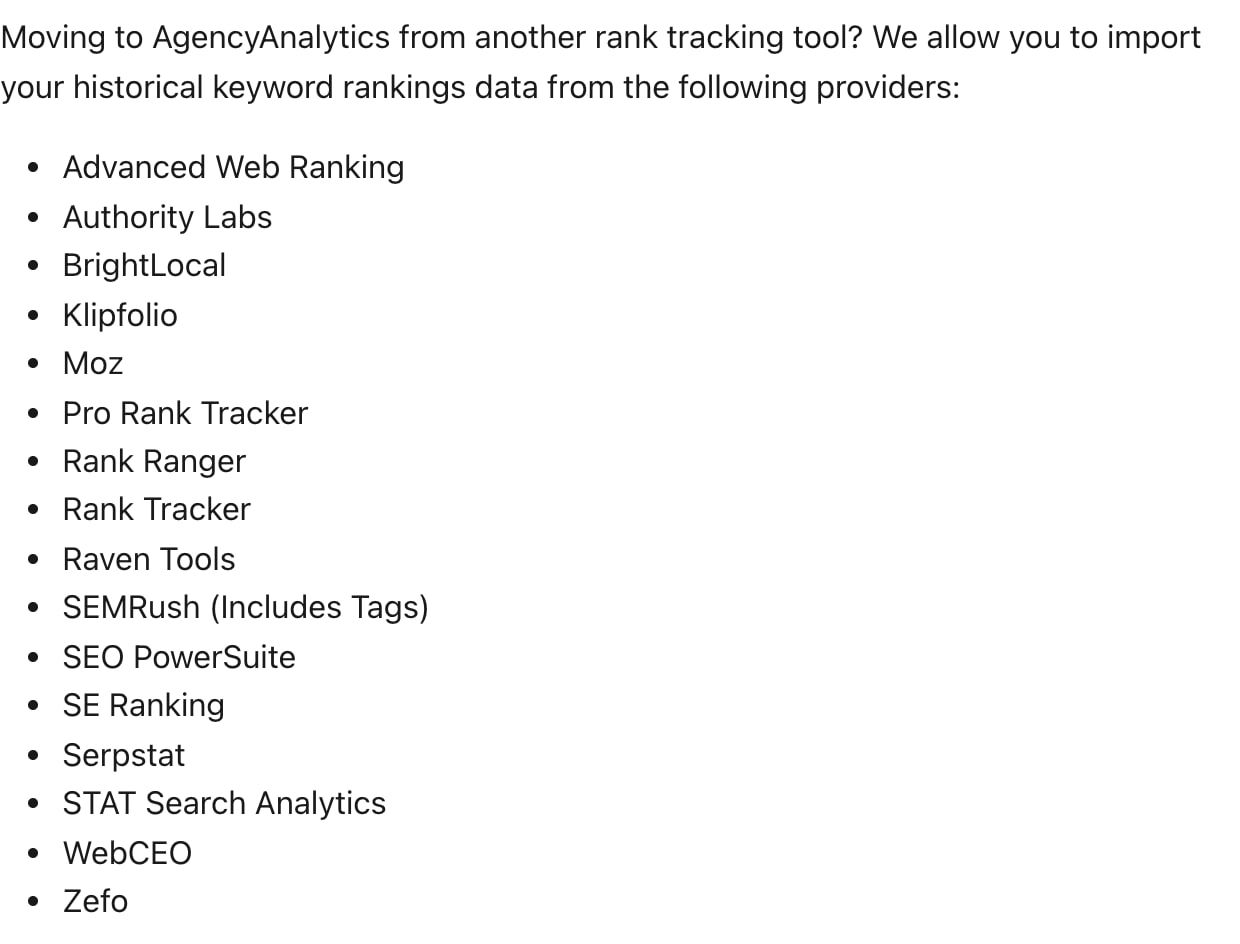
The sources behind the table: AWR, SE Ranking’s Semrush transfer and its subscription page, SEOmonitor, AccuRanker’s importer and its CSV page, Keyword.com, SEO PowerSuite’s migrate page and help article, Semrush’s blog, Mangools, and Ahrefs’ Rank Tracker page.
Two more notes. Wincher’s help says you can reach past data “by re-adding the site” if it was tracked in Wincher before, and links an import guide for other providers that I didn’t open (Wincher). And Semrush’s May 2025 blog gives the plan and a list of example platforms, not the steps.
What can’t be moved? #
History from before a project existed, deleted keywords and anything the importer doesn’t read, such as historical landing URLs from SEOmonitor.
From the docs above:
- Before the project or campaign was created. Semrush and Ahrefs both say history starts at creation.
- A deleted keyword’s history. Semrush says deleting a keyword loses it.
- Historical landing URLs from SEOmonitor. Its export page says that option isn’t available.
- Anything beyond Moz’s default 12 weeks, unless you export a longer date range yourself.
- What a doc is silent on. AgencyAnalytics’ page doesn’t mention locations, devices or competitors, so check them after importing one project first.
- Your report layouts and dashboards. SE Ranking says custom report layouts, dashboards, certain integrations, workflows and team structure need rebuilding by hand.
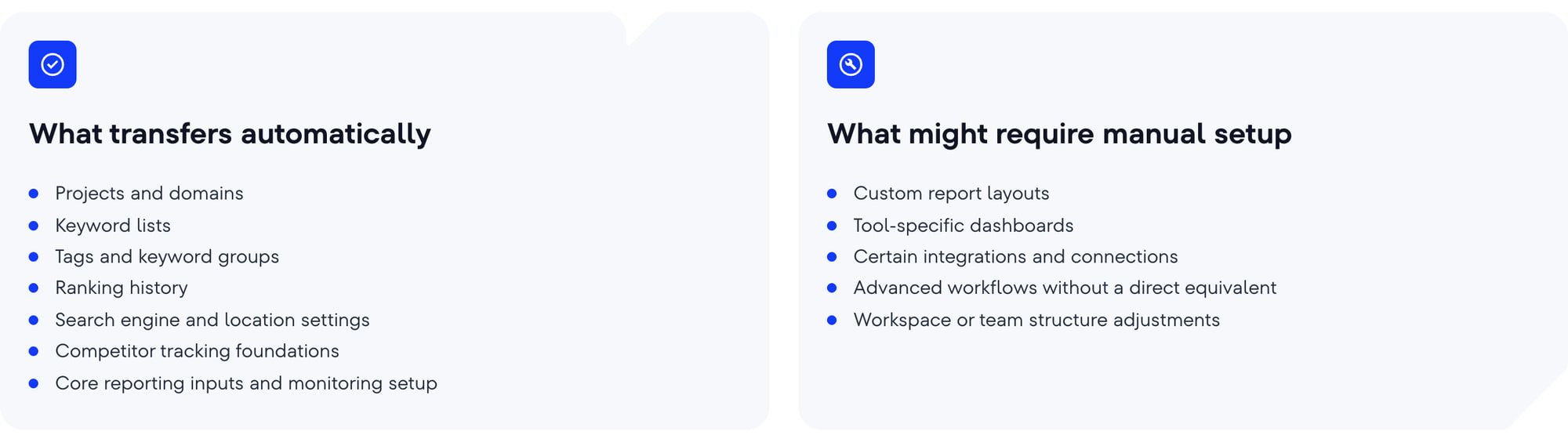
AI prompt history is a separate case. I found no importer for it in any doc I opened, so for tools that track AI answers, export what you can and archive it. How those tools collect data is in how AI visibility tools work.
What goes wrong in an import? #
Mostly formats: Excel dates, a non-empty client, one date per file and one engine per export.
AgencyAnalytics’ troubleshooting page gives an order to check: empty client, CSV format, folder structure, date format. Its import is blocked if integrations or tracked keywords already exist. The bulk import page adds that it imports SE Ranking data “by ranking date, not by the date the keyword was created”.
SE Ranking’s Semrush route needs the export from Position Tracking’s Overview tab with “Extended” ticked, one search engine per file, and you set engine, location and language at import. SEO PowerSuite wants the engines added to the project first. Keyword.com counts imported keywords toward your allowance. SEOmonitor wants domain, market and device in the file name.
How do you avoid a gap while you switch? #
Keep the old tool running until the new one has collected data. SEOmonitor says you can start migrating while the old account is still active, “to avoid gaps”.
Listicler’s 30-day plan runs the same way: export keywords and 12 to 24 months of rank history in week two, then run identical reports from both tools in week four, note the discrepancies, and cancel (Listicler). It names no export or import steps for any tool. Its claims that most tools delete data 30 to 90 days after cancelling and that most can’t fully import history carry no source, and the table above lists eight tools that document an import.
My rule, labelled as mine: keep the old tool until the new one has several weeks of its own data and its numbers agree with Search Console. Two trackers will differ for ordinary reasons, and my daily vs weekly rank tracking and rank tracker vs Search Console posts explain why.
Search Console is the record no tracker vendor controls. Google’s traffic-drop guide has you select “Last 16 months” and says “If you’d like to extend the 16 months, you could use the Search Analytics API or bulk data exports” (Google).
The bulk export’s “first export will happen up to 48 hours after your successful configuration”, it doesn’t backfill, and “Data will be accumulated forever for your project, unless you set an expiration time”. It needs a Google Cloud project (Search Console help).
Which one should you pick? #
Pick by where you’re going, and read that tool’s importer page before you cancel anything.
- An agency leaving Semrush, Moz or SE Ranking: AgencyAnalytics’ importer into a new, empty client. SEOmonitor’s Customer Success migration is the alternative if you’re coming from Semrush, Moz’s STAT, Ahrefs or AccuRanker.
- One site moving to SE Ranking: its self-serve import of a Semrush export, or assisted migration on an annual subscription. Check the Core plan’s history row first.
- Moving to Ahrefs, Nightwatch or Mangools (not from SE Ranking): I found no documented history import. Archive your CSVs, ask support, and keep the old tool until the new one has a few weeks of data.
- Anyone: turn on Search Console’s bulk export today and export the 16-month report.
If you’re leaving AgencyAnalytics itself, my AgencyAnalytics alternatives post covers that side. For the other trackers, my rank trackers hub lists them.
That’s my reading of the vendors’ pages, not a migration I’ve done. I’ll update this post when a vendor documents an importer for Ahrefs or Nightwatch, or for AI prompt history.
FAQ
Can you move rank history from one tracker to another?
Often, yes. Eight tools document an import: AgencyAnalytics, AWR, SE Ranking, SEOmonitor, AccuRanker, Keyword.com, SEO PowerSuite's Rank Tracker and, on the annual Guru plan or higher, Semrush. What survives depends on the old tool's export, so read the destination's importer page first.
Does Ahrefs import another tool's history?
I found no documented route. Ahrefs' Rank Tracker page promotes importing from Site Explorer with full ranking history, and its help says Rank Tracker history goes back to the day the project was created. Not documented is not the same as impossible, so ask support.
Why did my import fail?
The docs name a few usual causes. AgencyAnalytics needs an empty client, a ZIP with one folder called keywords, matching CSV columns and YYYY-MM-DD dates, since Excel reformats dates by default. SE Ranking takes one search engine per Semrush export, and SEO PowerSuite takes one ranking date per file.
How long should I run both trackers?
SEOmonitor says you can start migrating while the old account is still active, to avoid gaps. One directory blog suggests 30 days but gives no source for it. My rule: until the new tool has several weeks of its own data and its numbers agree with Search Console.
How far back does Search Console go?
Google's traffic-drop guide has you select the last 16 months. Its bulk export to BigQuery doesn't backfill: the first export happens up to 48 hours after you set it up, and data then accumulates. Turn it on now if you want history beyond 16 months.
Is assisted migration free?
SEOmonitor's page says migrated campaigns aren't billed. SE Ranking says free assisted migration comes with annual subscriptions, and monthly subscribers use self-serve import. AccuRanker's page says its Customer Success team helps and states no terms.
Can I move AI prompt history between trackers?
I found no importer for it in any doc I read. Treat AI prompt history as export-and-archive only until a vendor documents otherwise, and ask before you commit.
Sources
32 sources, accessed .
Official pricing, docs, changelogs and status pages 30
- AgencyAnalytics help: bulk import historical keyword rankings from another provider
- AgencyAnalytics help: troubleshooting historical rankings import errors
- Advanced Web Ranking help: import rankings from an external source
- Advanced Web Ranking help: export the data you need all at once
- SE Ranking: migrate to SE Ranking (vendor landing page)
- SE Ranking help: import keyword ranking history from Semrush (read as a text copy)
- SE Ranking: subscription page, migration terms and history limits (read as a text copy)
- SE Ranking help: how to work with the Rankings data, export options (read as a text copy)
- AccuRanker help: importing data from a third party
- AccuRanker help: importing keywords and historical data via CSV
- SEOmonitor help: ranking data migration from any other tool
- SEOmonitor help: full CSV export capabilities
- Keyword.com support: import your keywords from CSV
- Keyword.com support: exporting ranking data as PDF, CSV or text
- SEO PowerSuite (Link-Assistant): how to migrate to Rank Tracker
- SEO PowerSuite help: import rank history from other tools (read as a text copy)
- Semrush (vendor blog): can you import historical data from other SEO platforms? 13 May 2025
- Semrush knowledge base: Position Tracking
- Semrush knowledge base: how to see historical data in Position Tracking
- Moz help: exporting rankings to CSV (read as a text copy)
- Mangools help: add keywords from a file, KWFinder, Search Console or SE Ranking
- Mangools: SERPWatcher guide
- Ahrefs help: why the pre-set date ranges are greyed out in a Rank Tracker project
- Ahrefs help: how to use the Position History graph
- Ahrefs: Rank Tracker product page
- Nightwatch: rank tracker product page
- Nightwatch docs: adding and tracking keywords
- Google Search Central: debugging drops in Search traffic
- Search Console help: bulk data export
- Wincher help: can I see past ranking data for my site?
Last updated: 24 November 2026. Facts verified 24 Nov 2026. Researched and drafted with AI tools; owner review is pending.


