Screaming Frog or Sitebulb for your next site audit?
Screaming Frog is $279 a year per user, Sitebulb Pro $42 a month. I compared URL limits, team seats, cloud and AI options to say who should buy which.

Short on time? Here's my pick.
Screaming Frog is my pick for most people: $279 a year per user with USD selected, free up to 500 URLs, with custom extraction, Linux support and an MCP server that can start crawls. Pick Sitebulb Pro if you hand clients prioritized, branded audits, or Sitebulb Cloud if your team needs shared browser access.
Screaming Frog
Desktop crawler: raw data you shape yourself
Free to 500 URLs · $279 a year per user with USD selected (£199 in GBP) · verified 17 Nov 2026
Pick Screaming Frog if
you audit in-house or freelance, crawl big sites, need custom extraction, Linux or command-line runs, or want an AI assistant that can start crawls.
Sitebulb Pro
Desktop auditor with 300+ prioritized hints
14-day trial, no card · $42 a month or $425 a year · extra user $11 a month (17 Nov 2026)
Pick Sitebulb Pro if
you hand clients prioritized, branded PDF audits, or you're a team of three or more that wants cheaper extra seats than Screaming Frog's.
Sitebulb Cloud
Hosted Sitebulb with shared audits in the browser
From $125 a month or $1,500 a year · 2+ users · no trial
Pick Sitebulb Cloud if
several people need the same audits in a browser, with recurring crawls and no server of your own to run.
Still open
Whether Screaming Frog bills in dollars at checkout (its FAQ says prices are in GBP), whether Sitebulb Lite's 10,000-URL cap is per audit or in total, and Sitebulb's refund terms, which I couldn't find published.
Sponsors cannot buy a verdict.
Screaming Frog is the crawler I’d buy first: $279 a year per user with USD selected, or £199 in the GBP view, and free up to 500 URLs. Sitebulb is the better buy when your audit ends up in a client’s inbox, because Pro ranks issues with 300+ hints and exports branded PDFs, for $42 a month or $425 a year. Screaming Frog pricing and Sitebulb pricing, both read 17 Nov 2026.
Both do the same job: crawl a site and tell you what’s broken. The difference is what comes back. Screaming Frog hands you every row and lets you shape it; Sitebulb hands you a ranked to-do list you can pass on.
I read both vendors’ pricing pages, FAQs, guides and changelogs, worked out what 1 to 10 users pay, and checked the five comparisons that rank for this search. For the rest of the toolkit, start at the SEO tools hub.
How are Screaming Frog and Sitebulb different? #
Screaming Frog is a desktop crawler priced per user per year, with a free tier. Sitebulb sells desktop plans monthly or yearly, plus a hosted Cloud version, and has a trial instead of a free tier.
| What you get | Screaming Frog | Sitebulb |
|---|---|---|
| Kind of tool | Desktop crawler: raw data, exports, custom extraction | Desktop or cloud auditor with prioritized hints |
| Free way in | Free version, 500 URLs per crawl | 14-day trial of Pro, no card; no free plan |
| Cheapest paid | $279 a year per user (USD view); £199 (GBP view) | Lite: $18 a month or $180 a year |
| Agency-grade plan | Same licence; $265 each from 5 users | Pro: $42 a month or $425 a year; extra user $11 a month |
| Biggest crawl | Set by your RAM and disk | Lite 10,000; Pro 500,000 (up to 2 million); Cloud 10 million per audit |
| JavaScript rendering | Paid licence, built-in Chromium | Every plan |
| Scheduling | Paid licence, plus command line | Pro and Cloud |
| Hosted cloud | None; an official Google Cloud setup guide | Sitebulb Cloud, from $125 a month |
| MCP for AI assistants | Paid licence; can start crawls | Read-only, on finished audits |
| Operating systems | Windows, macOS, Linux (64-bit) | Windows, Mac; Cloud in a browser |
| Refund | Full refund within 14 days | No general policy found |
Source: Screaming Frog pricing page, FAQ and user guide; Sitebulb pricing page (prices read in a browser) and FAQ; all 17 Nov 2026. List prices before tax. Scroll sideways for more columns.
How much do Screaming Frog and Sitebulb cost? #
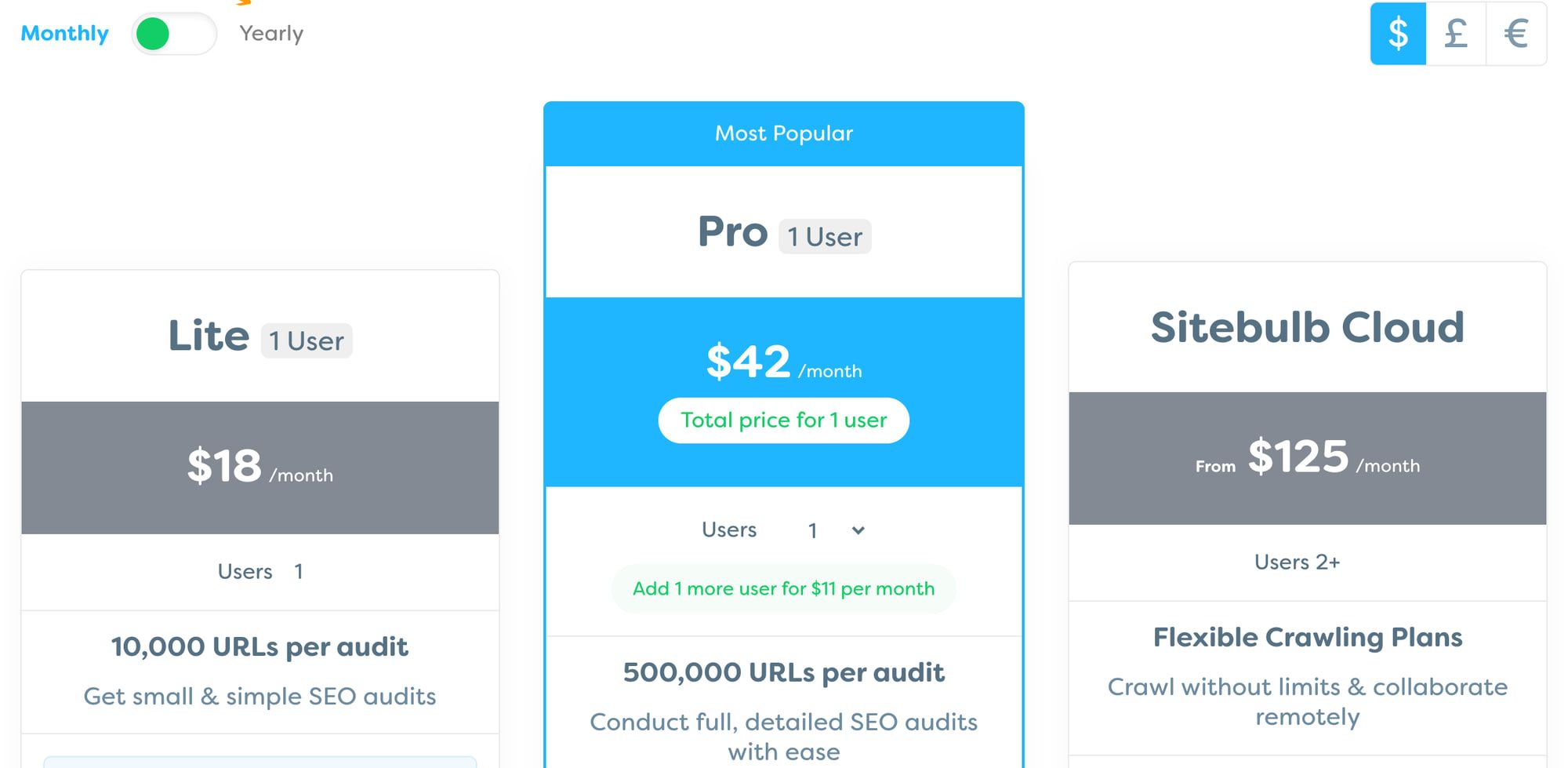
Screaming Frog is $279 a year per user with USD selected, or £199 in the GBP view, and it doesn’t sell a monthly plan. Sitebulb’s page shows Lite at $18 a month and Pro at $42 a month, with about 15% off if you pay yearly.
| Plan | Monthly | Yearly | Users |
|---|---|---|---|
| Screaming Frog free | $0 | $0 | 1 |
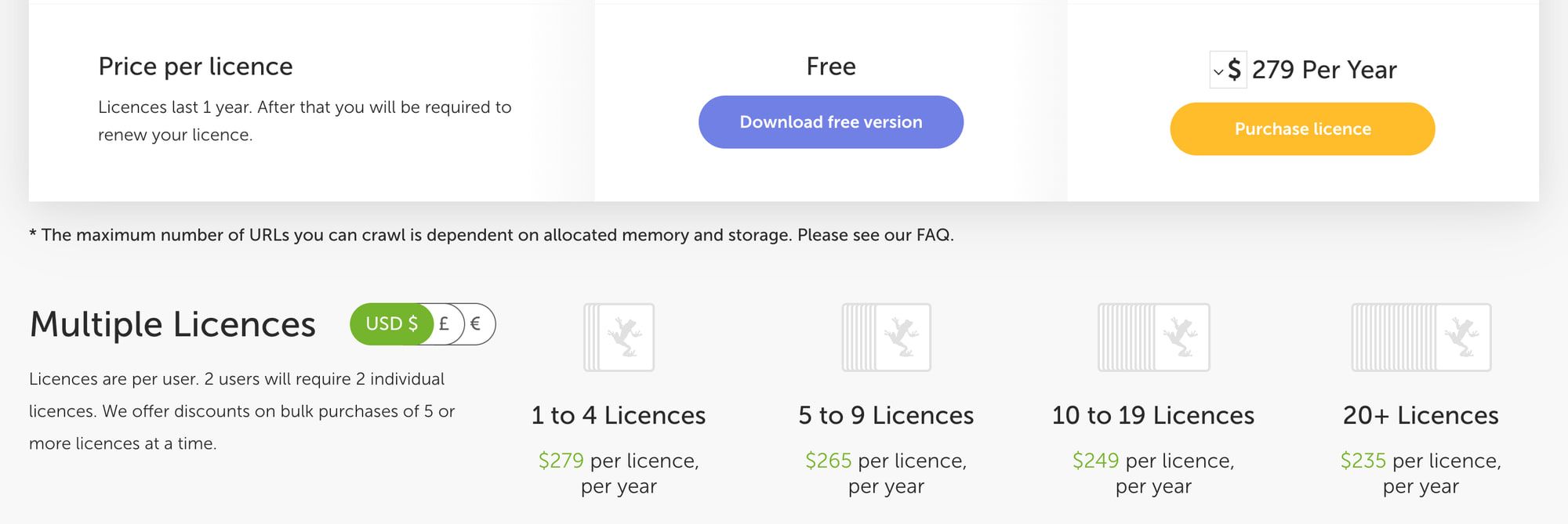
| Screaming Frog, 1 to 4 licences | Not sold | $279 each (£199) | Per user |
| Screaming Frog, 5 to 9 | Not sold | $265 each (£189) | Per user |
| Screaming Frog, 10 to 19 | Not sold | $249 each (£179) | Per user |
| Screaming Frog, 20+ | Not sold | $235 each (£169) | Per user |
| Sitebulb Lite | $18 | $180 | 1 |
| Sitebulb Pro | $42 | $425 | 1, plus $11 a month or $115.60 a year per extra user |
| Sitebulb Cloud | From $125 | From $1,500 | 2 or more |
Sources: Screaming Frog pricing (USD selected) and licence page (GBP view); Sitebulb pricing, read in a browser. All verified 17 Nov 2026.
On Screaming Frog, the page says “Licences last 1 year” and “2 users will require 2 individual licences”. Volume discounts start at five licences: 5% off at 5 to 9, about 10.8% at 10 to 19, and about 15.8% at 20 or more, by my arithmetic. That’s $23.25 a month for one person, spread over the year.
There’s a currency wrinkle. Screaming Frog’s FAQ says “The price of the SEO Spider is in pound sterling (GBP), but it can be purchased worldwide”, and the product page showed €245 in its own price block. So I’m printing the dollar figure the pricing page shows with USD selected, but I couldn’t confirm whether checkout charges dollars or converts from pounds.
On Sitebulb, prices only appear once the page’s scripts run, so the figures above come from a browser read of the pricing page on 17 Nov with the $ toggle on.
Paying yearly saves 15.7% on Pro ($425 against $504 for twelve months) and 16.7% on Lite ($180 against $216), which matches the page’s “Save 15% with yearly plans”. Spread over twelve months, yearly Pro is $35.42 and yearly Lite is $15.
The text version of the page, which shows pounds, adds two numbers: Pro extra users “from £7 per month” and Cloud “plans starting from £95/month”. It also says Cloud can run “in excess of £20k/year for big teams”, so the “from” price is a floor, not a typical bill.
Stale Sitebulb prices are everywhere. Pages I read quote Lite at $13.50, Pro at $35 or $105, desktop at $135 a year and Cloud at $245 or “$2,940/year”. None of those match the vendor’s page today. Two recent reads do: MADX (August 2026) and the directory softwares.com (checked 25 Oct 2026) both show the same $18 and $42 I saw.
One price fact cuts against my overall pick: Sitebulb Lite, at $180 a year, is cheaper than a Screaming Frog licence. The catch is its 10,000-URL cap and no scheduling, which I cover below.
What does a team of 3, 5 or 10 pay? #
Screaming Frog costs $837 a year for three people, $1,325 for five and $2,490 for ten. Sitebulb Pro on yearly billing costs less at every one of those sizes, because each extra Pro user is $115.60 a year.
| Team size | Screaming Frog (USD view) | Screaming Frog (GBP view) | Sitebulb Pro, yearly | Sitebulb Pro, monthly billing for 12 months |
|---|---|---|---|---|
| 1 person | $279 | £199 | $425 | $504 |
| 3 people | $837 | £597 | $656.20 | $768 |
| 5 people | $1,325 | £945 | $887.40 | $1,032 |
| 10 people | $2,490 | £1,790 | $1,465.40 | $1,692 |
My arithmetic from list prices, 17 Nov 2026. Screaming Frog uses its volume tiers ($265 each at 5 to 9, $249 at 10 to 19). Sitebulb Pro is the first user plus $115.60 a year, or $11 a month, per extra user.
So for one person, Screaming Frog is $146 a year cheaper than Sitebulb Pro. From three people up, Sitebulb Pro on yearly billing is cheaper: $180.80 less at three, and $1,024.60 less at ten, where it works out to about $146.54 per person against Screaming Frog’s $249.
Two caveats. Sitebulb’s page doesn’t say how many extra users Pro can take, and I couldn’t find whether Lite can add users at all. Cloud is out of this table because its “from $125 a month” price is for “2+ users” and the page doesn’t say how many seats that covers.
If only one person crawls and the rest read exports, you only need one Screaming Frog licence, though anyone who opens the saved crawl files needs their own, as the next sections explain.
What can you do for free? #
Screaming Frog’s free version crawls up to 500 URLs, but it can’t save crawls, render JavaScript, extract data or schedule. For how that limit compares with Search Console, Ahrefs Free and Bing, see the real limits of free SEO tools. Sitebulb has no free plan; it offers a 14-day trial of Pro with no card.
The two feature lists on Screaming Frog’s pricing page look the same as text, because the ticks are icons. Its FAQ and user guide settle what the licence adds:
| Screaming Frog free | Screaming Frog paid | |
|---|---|---|
| URLs per crawl | 500 | “Unlimited*”, set by memory and storage |
| Save and reopen crawls | No | Yes |
| Configuration | Restricted | Full, and saved as your default |
| JavaScript rendering | No | Yes |
| Custom search and extraction | No | Yes |
| Google Analytics, Search Console, PageSpeed Insights | No | Yes |
| Scheduling | No | Yes |
| MCP server | No | Yes |
| AI prompts (OpenAI, Gemini, Anthropic, Ollama) | Not stated | Listed |
Sources: Screaming Frog FAQ, user guide, MCP guide, pricing, 17 Nov 2026.
The free tier is enough for a small brochure site or a quick spot check. One Trustpilot reviewer put the other side bluntly: “the free version’s 500 url limit is useless for any actual site” (Trustpilot, 3 stars, 29 Oct 2025).
Sitebulb’s trial runs 14 days, needs no card, and is “equivalent to Sitebulb Pro (desktop)”, per its FAQ. The same FAQ says “We do not offer free trials for Sitebulb Cloud”.
My take: Screaming Frog’s free tier is the better way to learn the tool, because it doesn’t expire. Sitebulb’s trial is the better way to judge whether its hints save you time on a real client site, because it opens everything Pro does for two weeks.
How big a site can each handle? #
Sitebulb Lite stops at 10,000 URLs, Pro at 500,000 by default (2 million if raised) and Cloud at 10 million per audit. Screaming Frog’s paid limit is your machine: its FAQ ties crawl size to memory and storage.
| Plan | URL limit | Source |
|---|---|---|
| Screaming Frog free | 500 URLs per crawl | Pricing |
| Screaming Frog paid | “Unlimited*”, “dependent on allocated memory and storage” | Pricing |
| Sitebulb Lite | “10,000 URLs per audit” on the plan card; “10,000 URLs in total” in the FAQ | Pricing, FAQ |
| Sitebulb Pro | 500,000 per audit by default, raisable to 2 million | FAQ |
| Sitebulb Cloud | Up to 10 million per audit | FAQ |
The Lite conflict matters. The plan card says 10,000 URLs “per audit”, while the FAQ says Lite is “restricted to crawling 10,000 URLs in total”. The FAQ wording is stricter. If you plan to audit several small sites on Lite, ask Sitebulb which one applies before you pay.
Screaming Frog’s limit is hardware. Its FAQ gives rough figures for database storage mode: 2GB of allocated memory covers about 100,000 to 1 million URLs, 4GB about 2 million, and around 10GB about 5 million. In memory storage mode, it puts 8GB at roughly 200,000 URLs.
So past 2 million URLs on one desktop, Screaming Frog is the only one of the two that keeps going, as long as the machine has the memory and disk. Sitebulb’s answer for that size is Cloud, at up to 10 million per audit.
A Trustpilot reviewer who rated Screaming Frog 5 stars still noted “it can require a lot of resources, specifically RAM” (Trustpilot, Dec 2021). That’s the trade for having no fixed cap.
Do you want raw data or a ranked to-do list? #
Sitebulb ranks issues for you with “well over 300 Hints” and white-label PDF reports on Pro. Screaming Frog gives you every row, plus custom extraction, custom JavaScript and segmentation to build your own view. This is the real choice.
What Sitebulb Pro adds over Lite, per its upgrade page: white-label PDF reports, audit history and comparison, “well over 300 Hints”, PageSpeed and mobile tests per URL, Search Console keyword data, hreflang, code coverage and accessibility checks. Lite lists 100+ hints on the pricing page.
What Screaming Frog’s paid licence lists, per its pricing page: custom search and extraction, custom JavaScript, segmentation, crawl comparison, accessibility auditing, a “Data Studio Crawl Report” and command-line automation. Version 25.0 (3 Nov 2026) added a custom dashboard and configurable issues (release history).
Those last two features move Screaming Frog a little toward Sitebulb’s guided style. From release notes alone I can’t say how far; I’d still treat Sitebulb as the one built around a prioritized report.
| Your audit ends as… | Better fit | Why |
|---|---|---|
| A spreadsheet, dashboard or ticket list you build | Screaming Frog | Custom extraction, segmentation and exports let you shape the data |
| A PDF a client reads | Sitebulb Pro | Prioritized hints and white-label PDF reports |
| A before-and-after for a client | Either | Screaming Frog has crawl comparison; Sitebulb Pro has audit comparison |
| Data scraped from page templates (prices, authors, schema fields) | Screaming Frog | Custom search and extraction |
Even an old Hacker News comment from someone who points people to Sitebulb’s support address said “The main difference from Screaming Frog (which is legitimately awesome) is the reporting” (HN, 2017). That’s a party talking, and it’s nine years old, but the split it describes still matches what both vendors publish.
If reports are the bottleneck in your agency, SEO client reporting for small agencies prices the white-label options beyond crawlers.
Do both render JavaScript and run on a schedule? #
Yes, with conditions. Screaming Frog needs the paid licence for JavaScript rendering, scheduling and the Google integrations; Sitebulb includes JavaScript crawling on every plan and schedules audits on Pro and Cloud.
| Screaming Frog | Sitebulb | |
|---|---|---|
| JavaScript rendering | “Integrated Chromium WRS”, paid licence | “JavaScript crawling is included in all Sitebulb plans”; Cloud says “Evergreen Chromium” |
| Scheduled crawls | Paid licence | Pro (scheduled audits) and Cloud (recurring crawls); not Lite |
| Automation | Command-line automation | Not described in what I read |
| Comparing crawls | Auto Compare Crawls and crawl changes in email notifications (24.0) | Audit comparison on Pro |
| Google data | Analytics, Search Console, PageSpeed Insights (paid) | Analytics, Search Console and Sheets listed; Pro adds per-URL PageSpeed and Search Console keyword data |
| Looker Studio | “Data Studio Crawl Report” | Not seen in what I read |
Sources: Screaming Frog product page, user guide, release history; Sitebulb FAQ, Cloud page, upgrade page. All 17 Nov 2026.
Sitebulb’s own comparison page labels Screaming Frog’s JavaScript crawling a “Paid add-on”. That’s misleading: rendering is part of Screaming Frog’s one paid licence, not sold separately. The fair version: Screaming Frog’s free tier doesn’t render JavaScript, and every Sitebulb plan does.
What if your team needs the cloud? #
Sitebulb Cloud runs in the browser with shared audits, from $125 a month and with no trial. Screaming Frog has no hosted cloud, but it publishes its own guide to running the crawler on Google Compute Engine, and every user still needs a licence.
| Screaming Frog on Google Compute Engine | Sitebulb Cloud | |
|---|---|---|
| Who runs it | You, following Screaming Frog’s guide | Sitebulb, in your browser |
| Licences | “Any user of any instance requires their own individual licence” | Each Cloud seat includes a Pro desktop licence |
| What it costs | Licence plus Google’s bill: “less than £20” for one 3.1-million-URL crawl; “around $277.89” a month if left running; about $5 a month for a stored snapshot | From $125 a month or $1,500 a year; “in excess of £20k/year for big teams” |
| Crawl size | Whatever memory and disk you give the machine | Up to 10 million URLs per audit |
| Sharing | Pass saved crawl files around | Real-time collaboration |
| Trial | Free version only | None |
Sources: Screaming Frog cloud guide (first published May 2022, updated 13 Nov 2026; its cost figures are “at the time of writing”), Sitebulb FAQ, Sitebulb Cloud, Sitebulb pricing.
So Sitebulb’s claim that Screaming Frog is “desktop only, with no cloud capabilities” (Sitebulb) is too strong: there’s no hosted product, but there is a documented cloud route. The cost lesson from its own guide: stop the machine after each crawl, or a monthly bill of about $277.89 replaces a one-off crawl under £20.
Sharing without the cloud is clunky. Screaming Frog’s teams guide suggests sharing saved crawls through network drives or Dropbox, warns that the crawl database can’t sit on a network drive, and says “Exporting and opening a crawl requires a licence”. It also notes Chrome Remote Desktop “does not support concurrent connections”.
Sitebulb Cloud pitches “No project limits, no lock-in contracts, and no stressful crawl credits” (Cloud page). If two or more people need the same live audit, it’s the only hosted option of the two. If you crawl only now and then and someone on the team is comfortable with Google Cloud, Screaming Frog’s route can cost less, but you do the setup and the sharing.
Can you plug them into ChatGPT or Claude? #
Both added MCP servers in 2026, the protocol AI assistants use to talk to other software. Screaming Frog’s can start crawls and needs a paid licence. Sitebulb’s is read-only on finished audits, and the trial includes it.
| Screaming Frog | Sitebulb | |
|---|---|---|
| Launched | Version 24.0, 19 May 2026 | Version 10.0, 9 Sep 2026 |
| Which plans | “This is a paid licence feature only. It will not work in the free version” | “Available on all Desktop and Cloud plans, including the free trial”; the pricing page lists it on Lite, Pro and Cloud |
| Can start a crawl | Yes: it can “run crawls, analyse, export and manipulate data” | No: “The MCP is read-only, so it can’t start a crawl” |
| Named AI tools | Claude Desktop, LM Studio, Google Antigravity | Claude connector, ChatGPT plugin |
| Setup needs | Database storage mode and a Node.js runtime | Add it as a Claude connector or ChatGPT plugin, then sign in with a Sitebulb account |
Sources: Screaming Frog MCP guide, release history; Sitebulb MCP page, launch post, pricing. All 17 Nov 2026.
Screaming Frog also lists an “AI Integration (OpenAI, Gemini, Anthropic & Ollama)” for running prompts against crawled pages. I couldn’t tell from its pages whether that works in the free version.
The practical difference: with Screaming Frog, you can ask an assistant to crawl a site and then question the results. With Sitebulb, you run the audit yourself and then ask the assistant about it.
Can you get a refund if it’s not for you? #
Screaming Frog gives a full refund within 14 days and sells one-year licences per user. Sitebulb lets you cancel in its customer portal, but I found no general refund policy, and its terms page returned a 404.
| Screaming Frog | Sitebulb | |
|---|---|---|
| Billing | Yearly only; “Licences last 1 year” | Monthly or yearly |
| Who can use it | Per user; one person on several devices | Lite and Pro 1 user each; Pro can add users; Cloud 2 or more |
| Refund | “Full refund if you contact us within 14 days”; no pro-rata refunds | No general policy found; “pro-rata refund for any overlap” when moving from Pro to Cloud |
| Renewal | Auto-renew is opt-in at purchase and can’t be added later | Cancel in the Customer Portal |
| Payment | Cards and PayPal | Card or PayPal; purchase order or invoice on yearly plans only |
| Currency | FAQ: price “is in pound sterling (GBP)”; pricing page shows $279 with USD selected | $ toggle shows USD; page text shows GBP |
| Tax note | EU businesses can add a VAT ID (checked via VIES) | Not checked |
| Systems | 64-bit Windows, macOS, Linux | Windows or Mac; Cloud in a browser |
Sources: Screaming Frog FAQ, pricing; Sitebulb FAQ, pricing. Both 17 Nov 2026.
The safety nets differ: with Screaming Frog you pay and can get your money back within 14 days; with Sitebulb you try before paying, but once you pay I couldn’t find a published route back.
Linux is a clean split. If your team runs Linux desktops or servers, Screaming Frog supports them and Sitebulb’s desktop app doesn’t.
What changed in the last year? #
Both shipped MCP servers, and Screaming Frog added automatic crawl comparison and a custom dashboard. The dated changes:
| Date | Screaming Frog | Sitebulb |
|---|---|---|
| Nov 2025 to Feb 2026 | 23.1 (18 Nov), 23.2 (16 Dec), 23.3 (18 Feb) | 9.4.3 (27 Jan): Link Analysis split; 9.5.0 (27 Feb): new “HTML > 2MB” hint |
| Apr 2026 | 9.8.2 (23 Apr): performance | |
| May 2026 | 24.0 (19 May): MCP server, Auto Compare Crawls, crawl changes in email notifications, Arm64 Linux | |
| Jun 2026 | 24.1 to 24.3 | |
| Sep 2026 | 10.0 (9 Sep): Sitebulb MCP launch | |
| Nov 2026 | 25.0 (3 Nov): JSON config, MCP debugging tools, custom dashboard, configurable issues; 25.1 (4 Nov) | Download button shows v10.2 |
Sources: Screaming Frog release history, Sitebulb release notes, 17 Nov 2026.
On price, the tracker Pulse Signal recorded no verified Sitebulb price change since 8 Aug 2026. Older Screaming Frog prices of £149 and $259 still circulate; I couldn’t find when the current £199 started.
What do users say about them? #
Screaming Frog gets praise for depth, support and price, and complaints about a technical interface and RAM use. Sitebulb’s praise mostly comes from ranking pages and its own testimonials, because the review sites I checked were blocked or missing.
Screaming Frog on Trustpilot has 3.6 from just 15 reviews on an unclaimed profile (Trustpilot), too few to mean much. One reviewer says “Their email support is fast and very-very good” (5 stars, Jun 2026); another that “The interface feel a bit technical for beginners” (4 stars, Jan 2026).
Sitebulb’s Trustpilot page returned a 404, and G2 and Capterra blocked my tools. Secondhand: Toolradar shows Screaming Frog at 4.8 from 218 reviews and Sitebulb at 4.7 from 38, and MADX’s G2 screenshots show 4.7 and 4.5. Sitebulb’s own comparison page says it hears “all the time” from Screaming Frog users that the interface “is outdated and not very user-friendly”, but that’s Sitebulb’s framing, not a review score.
On Hacker News the threads are old. A 2017 commenter said “SF is also a lot cheaper” (HN), which still holds for one person but not for a team on Sitebulb Pro, as the team table shows.
Who wrote the comparisons you’ll find for this search? #
None of the seven pages I read for this search is neutral. One is Sitebulb’s own page, two are SEO agencies selling services, one is a consultant promoting his services, one sells WordPress plugins, and two are directories.
| Page | Who’s behind it | Date shown | What’s dated or off |
|---|---|---|---|
| alejandrorioja.com | A consultant promoting his own services | 23 Oct 2026 | No prices at all; says neither tool has GEO tracking “as of early 2026” and doesn’t mention either MCP server |
| seorepairkit.com | A WordPress SEO plugin seller | 27 Mar 2025 | Screaming Frog “$259/year”; Sitebulb Cloud “$2,940/year” with two different URL limits on the same page |
| madx.digital | A B2B SaaS SEO agency | 10 Aug 2026 | Sitebulb $18 and $42 match today; credits Screaming Frog with keyword research, rank tracking and content tools |
| sitebulb.com | Sitebulb itself | Undated | Screaming Frog “no cloud capabilities” and JavaScript a “Paid add-on” |
| hashmeta.com | An SEO agency | 15 Jan 2026 | Screaming Frog “£149”; a Sitebulb free tier and plan names that aren’t on the pricing page |
Six of the 17 results I saw for this search were copies of the same alejandrorioja.com article, most of them in other languages. Another ranking comparison, on searchatlas.com, returned a 404 when I opened it. Apart from Postmake, whose footer says “Some of our links are affiliate links”, none of the pages I read discloses a commercial relationship with either vendor.
Claims I checked on 17 Nov 2026
- Screaming Frog costs £149 or $259 a year. The pricing page shows £199 in GBP and $279 with USD selected (pricing).
- Sitebulb has a free plan up to 5,000 URLs. There’s a 14-day trial and no free plan (FAQ).
- Sitebulb Lite crawls unlimited URLs. The FAQ says Lite is “restricted to crawling 10,000 URLs in total”.
- Screaming Frog does keyword research, rank tracking and content planning. It’s a crawler; none of these are on its feature list. For those jobs, see Semrush alternatives or Ahrefs alternatives.
- Screaming Frog’s JavaScript rendering is a paid add-on. It’s part of the single paid licence (user guide).
- Screaming Frog has no cloud option. No hosted product, but an official Google Compute Engine guide (cloud guide).
- Neither tool has native GEO tracking “as of early 2026”. That ranking page never mentions MCP, yet both tools shipped MCP servers that connect audits to AI assistants this year, in May and September 2026.
- Screaming Frog’s year costs less than a month of Sitebulb. One page compared £149 with $105 a month to say this. At today’s prices, Screaming Frog’s $279 a year is about 6.6 months of Sitebulb Pro at $42.
Should you just buy both? #
Some people do: Screaming Frog for digging and Sitebulb for the client report. Screaming Frog plus Sitebulb Pro on yearly billing is $704 a year for one person; with Lite instead, it’s $459.
| Setup for one person | Yearly cost | What it gets you |
|---|---|---|
| Screaming Frog only | $279 | Unlimited crawls by hardware, extraction, MCP that runs crawls |
| Sitebulb Pro only | $425 | 300+ hints, white-label PDFs, scheduling, up to 2 million URLs |
| Screaming Frog + Sitebulb Lite | $459 | Both styles, but Sitebulb capped at 10,000 URLs and no PDFs |
| Screaming Frog + Sitebulb Pro | $704 | Both styles at full strength |
| Screaming Frog + Log File Analyser | £298 (GBP view) | Crawls plus server log analysis |
My arithmetic from list prices, 17 Nov 2026. The Log File Analyser is £99 a year, with a free version limited to 1,000 log lines and one project (Log File Analyser); I didn’t see its dollar price.
For a solo consultant, I’d start with Screaming Frog alone and add Sitebulb Pro only when a client wants a report you can’t build quickly. Use Sitebulb’s 14-day trial on a real client site first, so you know whether its hints save you hours.
So which crawler should you pick? #
Most in-house SEOs and freelancers: Screaming Frog, $279 a year per user with USD selected (£199 in GBP). It has no URL cap beyond your hardware, custom extraction, Linux and command-line support, an MCP server that can start crawls, and a 14-day refund.
Consultants and agencies that hand clients prioritized, branded audits: Sitebulb Pro, $42 a month or $425 a year. The 300+ hints and white-label PDFs are the product. For a team of three or more, its $115.60 extra seats also undercut Screaming Frog’s licences.
Teams that need shared browser access and scheduled crawls without running a server: Sitebulb Cloud, from $125 a month or $1,500 a year. There’s no trial, so ask what your seat count costs before you commit, and trial Pro first to see the reports.
Very large sites, millions of URLs, on one machine: Screaming Frog with the memory to match. Sitebulb Pro tops out at 2 million and Cloud at 10 million per audit.
A site under 500 URLs: Screaming Frog free. Sites between 500 and 10,000 URLs on the smallest budget: Sitebulb Lite at $180 a year, as long as you confirm whether its 10,000-URL cap is per audit or in total.
You want an AI assistant to run crawls for you: Screaming Frog. If read-only questions about finished audits are enough, Sitebulb’s MCP works from the cheapest plan and the trial.
Neither tool tracks rankings or researches keywords, so budget for that separately. My SEO tool stacks priced from $0 to $250 a month show where a crawler fits next to the rest.
FAQ
Is Screaming Frog free?
Partly. The free version crawls up to 500 URLs per crawl, but it can't save crawls, render JavaScript, run custom extraction, connect Google Analytics, Search Console or PageSpeed Insights, schedule crawls or use the MCP server. The paid licence is $279 a year per user with USD selected on its pricing page, or £199 in the GBP view (17 Nov 2026).
How much is Sitebulb?
Sitebulb's pricing page showed Lite at $18 a month or $180 a year, Pro at $42 a month or $425 a year, and Cloud from $125 a month or $1,500 a year, read in a browser on 17 Nov 2026. Each extra Pro user is $11 a month or $115.60 a year. Prices from older reviews ($13.50, $35, $105) don't match the page.
Does Sitebulb have a free trial?
Yes, for the desktop plans: 14 days, no card, and Sitebulb's FAQ says the trial is equivalent to Sitebulb Pro. There's no free plan, and the FAQ says 'We do not offer free trials for Sitebulb Cloud'.
Can two people share a Screaming Frog licence?
No. Screaming Frog says licences are per user, so 2 users need 2 licences. One person can install it on several of their own devices. Its teams guide adds that exporting and opening a saved crawl requires a licence, so everyone who works with the crawl files needs one.
Which handles bigger sites?
Screaming Frog, if you give it the memory. Its paid crawl limit depends on allocated memory and storage, and its FAQ puts about 4GB at roughly 2 million URLs and about 10GB at roughly 5 million in database mode. Sitebulb Pro stops at 500,000 URLs by default, raisable to 2 million; Sitebulb Cloud goes up to 10 million per audit.
Does Screaming Frog work in the cloud?
Not as a hosted product, but Screaming Frog publishes its own guide to running the SEO Spider on Google Compute Engine. Every user of any instance still needs their own licence, and you pay Google for the machine. Sitebulb Cloud is the hosted, browser-based option, from $125 a month.
Which one works with Claude or ChatGPT?
Both added MCP servers in 2026. Screaming Frog's (version 24.0, 19 May 2026) needs a paid licence and can run crawls, analyse, export and manipulate data. Sitebulb's (version 10.0, 9 Sep 2026) is read-only: it answers questions about finished audits but can't start a crawl. It works on the trial too.
FAQ sources: Screaming Frog pricing, FAQ, teams guide, cloud guide and MCP guide; Sitebulb pricing, FAQ and MCP launch post. All checked 17 Nov 2026; Sitebulb’s prices read in a browser.
Sources
29 sources, accessed .
Official pricing, docs, changelogs and status pages 18
- Screaming Frog SEO Spider pricing (USD selected, read in a browser)
- Screaming Frog SEO Spider licence (GBP view)
- Screaming Frog SEO Spider product page (version 25.1)
- Screaming Frog SEO Spider FAQ: free limits, refunds, currency, memory
- Screaming Frog user guide: what the licence adds
- Screaming Frog SEO Spider release history
- Screaming Frog MCP server guide
- Screaming Frog: running the SEO Spider on Google Compute Engine
- Screaming Frog: working in teams
- Screaming Frog Log File Analyser
- Sitebulb pricing (USD prices read in a browser)
- Sitebulb FAQs: URL limits, trial, Cloud, cancellation
- Sitebulb: what Pro adds over Lite
- Sitebulb Cloud (read via a text reader)
- Sitebulb release notes
- Sitebulb MCP feature page
- Sitebulb MCP launch post (9 Sep 2026)
- Sitebulb's own Sitebulb vs Screaming Frog page (ranking page)
Review platforms 1
Community discussions 2
Other blogs 5
- Alejandro Rioja: Sitebulb vs Screaming Frog (ranking page)
- SEO Repair Kit (a WordPress plugin seller): comparison (ranking page)
- MADX (an SEO agency): Screaming Frog vs Sitebulb (ranking page)
- Hashmeta (an SEO agency): comparison (ranking page, read via a text reader)
- Postmake: directory comparison card (ranking page)
Last updated: 17 November 2026. Researched and drafted with AI tools; the owner’s editorial review is in progress.


